Free with trial This image is created by Artificial Intelligence. Three cyan sticky notes with black binder clips hold the words 'Code', 'Review', and 'Deploy' against a dark gray background. The notes have curled corners, giving a sense of realism. The image conveys a sense of organization and planning. The overall mood is professional and informative. The image can be used for presentations or articles related. Code deploy illustrations Three blue sticky notes with code review deploy text on black background. This image is created by Artificial Intelligence. Three cyan sticky notes with black. This image is created by Artificial Intelligence. Three cyan sticky notes with black binder clips hold the words 'Code', 'Review', and 'Deploy' against a dark gray background. The notes have curled corners, giving a sense of realism. The image conveys a sense of organization and planning. The overall mood is professional and informative. The image can be used for presentations or articles related
Free with trial This image is created by Artificial Intelligence. Three cyan sticky notes with curled corners are clipped with black binder clips on a dark gray background. The notes read 'Code', 'Review', and 'Deploy' in bold black font. The image evokes a sense of organization and planning, and could be used for software development or project management concepts. The overall mood is professional and. Code deploy illustrations Three blue sticky notes with code review deploy text on black background. This image is created by Artificial Intelligence. Three cyan sticky notes with curled. This image is created by Artificial Intelligence. Three cyan sticky notes with curled corners are clipped with black binder clips on a dark gray background. The notes read 'Code', 'Review', and 'Deploy' in bold black font. The image evokes a sense of organization and planning, and could be used for software development or project management concepts. The overall mood is professional and
Free with trial Continuous showing continuous integration pipeline flowchart with code build test deploy monitor stages. resolution use. Code deploy illustrations Continuous Integration Pipeline Flowchart with Code Build Test Deploy Monitor Stages. Continuous showing continuous integration pipeline flowchart with code. Continuous showing continuous integration pipeline flowchart with code build test deploy monitor stages. resolution use
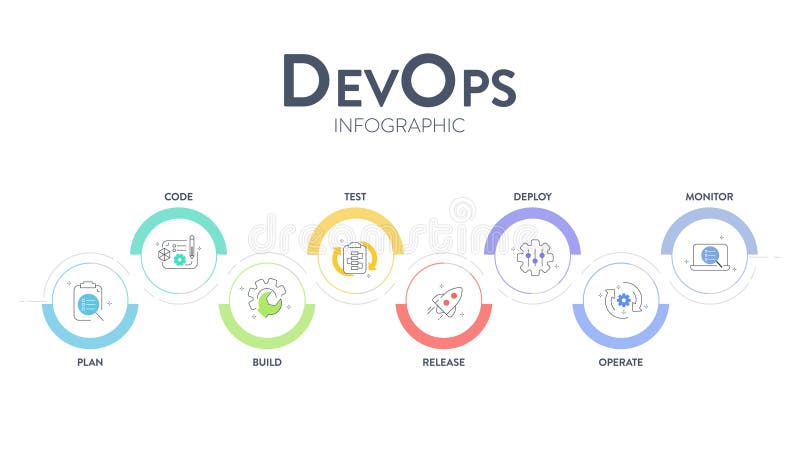
Free with trial DevOps banner concept has 8 steps to analyze such as plan, code, build, operate, deploy, test, monitor and release for Software development and information technology operations. Infographic vector. Code deploy vectors DevOps banner concept has 8 steps to analyze such as plan, code, build, operate, deploy, test, monitor and release for Software. Development and information. DevOps banner concept has 8 steps to analyze such as plan, code, build, operate, deploy, test, monitor and release for Software development and information technology operations. Infographic vector
Free with trial DevOps banner concept has 8 steps to analyze such as plan, code, build, operate, deploy, test, monitor and release for Software development and information technology operations. Infographic vector. Code deploy vectors DevOps banner concept has 8 steps to analyze such as plan, code, build, operate, deploy, test, monitor and release for Software. Development and information. DevOps banner concept has 8 steps to analyze such as plan, code, build, operate, deploy, test, monitor and release for Software development and information technology operations. Infographic vector
Free with trial DevOps banner concept has 8 steps to analyze such as plan, code, build, operate, deploy, test, monitor and release for Software development and information technology operations. Infographic vector. Code deploy vectors DevOps banner concept has 8 steps to analyze such as plan, code, build, operate, deploy, test, monitor and release for Software. Development and information. DevOps banner concept has 8 steps to analyze such as plan, code, build, operate, deploy, test, monitor and release for Software development and information technology operations. Infographic vector
Free with trial DevOps banner concept has 8 steps to analyze such as plan, code, build, operate, deploy, test, monitor and release for Software development and information technology operations. Infographic vector. Code deploy vectors DevOps banner concept has 8 steps to analyze such as plan, code, build, operate, deploy, test, monitor and release for Software. Development and information. DevOps banner concept has 8 steps to analyze such as plan, code, build, operate, deploy, test, monitor and release for Software development and information technology operations. Infographic vector
Free with trial Comprehensive set of isometric software development icons displayed in rounded squares featuring essential tech concepts like programming notebook interface prototype UI design code refactor optimization modular architecture server deploy jobs and system performance monitoring clean style with soft colors suitable for web design mobile applications technical dashboards and digital agency presentations. Code deploy illustrations Isometric software development concept icons set showing programming notebook prototype code refactor modules deploy jobs and syst. Comprehensive set of. Comprehensive set of isometric software development icons displayed in rounded squares featuring essential tech concepts like programming notebook interface prototype UI design code refactor optimization modular architecture server deploy jobs and system performance monitoring clean style with soft colors suitable for web design mobile applications technical dashboards and digital agency presentations.
Free with trial DevOps banner concept has 8 steps to analyze such as plan, code, build, operate, deploy, test, monitor and release for Software development and information technology operations. Infographic vector. Code deploy vectors DevOps banner concept has 8 steps to analyze such as plan, code, build, operate, deploy, test, monitor and release for Software. Development and information. DevOps banner concept has 8 steps to analyze such as plan, code, build, operate, deploy, test, monitor and release for Software development and information technology operations. Infographic vector
Free with trial DevOps banner concept has 8 steps to analyze such as plan, code, build, operate, deploy, test, monitor and release for Software development and information technology operations. Infographic vector. Code deploy vectors DevOps banner concept has 8 steps to analyze such as plan, code, build, operate, deploy, test, monitor and release for Software. Development and information. DevOps banner concept has 8 steps to analyze such as plan, code, build, operate, deploy, test, monitor and release for Software development and information technology operations. Infographic vector
Free with trial DevOps banner concept has 8 steps to analyze such as plan, code, build, operate, deploy, test, monitor and release for Software development and information technology operations. Infographic vector. Code deploy vectors DevOps banner concept has 8 steps to analyze such as plan, code, build, operate, deploy, test, monitor and release for Software. Development and information. DevOps banner concept has 8 steps to analyze such as plan, code, build, operate, deploy, test, monitor and release for Software development and information technology operations. Infographic vector
Free with trial DevOps banner concept has 8 steps to analyze such as plan, code, build, operate, deploy, test, monitor and release for Software development and information technology operations. Infographic vector. Code deploy vectors DevOps banner concept has 8 steps to analyze such as plan, code, build, operate, deploy, test, monitor and release for Software. Development and information. DevOps banner concept has 8 steps to analyze such as plan, code, build, operate, deploy, test, monitor and release for Software development and information technology operations. Infographic vector
Free with trial Diagram illustrating the Software Development Lifecycle (SDLC) on a blue background. The process is depicted in a circular flow, consisting of interconnected stages: Design, Code, Build, Deploy, Manage, and Monitor. Each stage is represented by a labeled icon for example, a pencil for Design, a computer for Code, and a graph for Monitor. Arrows connect each step, indicating the progression and cyclical nature of the development process. The arrangement emphasizes continuous improvement and management of software development. Code deploy illustrations Software Development Lifecycle (SDLC) Diagram: Design, Code, Build, Deploy, Manage, Monitor. Diagram illustrating the Software Development Lifecycle (SDLC) on a. Diagram illustrating the Software Development Lifecycle (SDLC) on a blue background. The process is depicted in a circular flow, consisting of interconnected stages: Design, Code, Build, Deploy, Manage, and Monitor. Each stage is represented by a labeled icon for example, a pencil for Design, a computer for Code, and a graph for Monitor. Arrows connect each step, indicating the progression and cyclical nature of the development process. The arrangement emphasizes continuous improvement and management of software development.
Free with trial DevOps banner concept has 8 steps to analyze such as plan, code, build, operate, deploy, test, monitor and release for Software development and information technology operations. Infographic vector. Code deploy vectors DevOps banner concept has 8 steps to analyze such as plan, code, build, operate, deploy, test, monitor and release for Software. Development and information. DevOps banner concept has 8 steps to analyze such as plan, code, build, operate, deploy, test, monitor and release for Software development and information technology operations. Infographic vector
Free with trial DevOps banner concept has 8 steps to analyze such as plan, code, build, operate, deploy, test, monitor and release for Software development and information technology operations. Infographic vector. Code deploy illustrations DevOps banner concept has 8 steps to analyze such as plan, code, build, operate, deploy, test, monitor and release for Software. Development and information. DevOps banner concept has 8 steps to analyze such as plan, code, build, operate, deploy, test, monitor and release for Software development and information technology operations. Infographic vector
Free with trial DevOps banner concept has 8 steps to analyze such as plan, code, build, operate, deploy, test, monitor and release for Software development and information technology operations. Infographic vector. Code deploy vectors DevOps banner concept has 8 steps to analyze such as plan, code, build, operate, deploy, test, monitor and release for Software. Development and information. DevOps banner concept has 8 steps to analyze such as plan, code, build, operate, deploy, test, monitor and release for Software development and information technology operations. Infographic vector
Free with trial DevOps banner concept has 8 steps to analyze such as plan, code, build, operate, deploy, test, monitor and release for Software development and information technology operations. Infographic vector. Code deploy vectors DevOps banner concept has 8 steps to analyze such as plan, code, build, operate, deploy, test, monitor and release for Software. Development and information. DevOps banner concept has 8 steps to analyze such as plan, code, build, operate, deploy, test, monitor and release for Software development and information technology operations. Infographic vector
Free with trial This set of six flat design icons visually represents key stages of the software development lifecycle. Each icon is paired with a clear label: 'COMMIT' (a document with a checkmark), 'BUILD' (a gear with code symbols), 'TEST' (a document with a test tube), and 'DEPLOY' (a cloud with an upload arrow). These icons are ideal for illustrating concepts related to programming, IT processes, project management, and digital workflows. Code deploy illustrations Software Development Lifecycle Icons: Commit, Build, Test, Deploy. This set of six flat design icons visually represents key stages of the software development. This set of six flat design icons visually represents key stages of the software development lifecycle. Each icon is paired with a clear label: 'COMMIT' (a document with a checkmark), 'BUILD' (a gear with code symbols), 'TEST' (a document with a test tube), and 'DEPLOY' (a cloud with an upload arrow). These icons are ideal for illustrating concepts related to programming, IT processes, project management, and digital workflows.
Free with trial Developer hands are typing quickly on a backlit mechanical keyboard, interacting with a glowing holographic infinity loop visualization that displays the stages of build, test, and deploy. the scene is set in a modern tech startup office with multiple monitors displaying code, creating a fast-paced and productive atmosphere with blue and purple light - created using generative AI. Code deploy illustrations Developer hands typing with holographic build test deploy pipeline. Developer hands are typing quickly on a backlit mechanical keyboard, interacting with a. Developer hands are typing quickly on a backlit mechanical keyboard, interacting with a glowing holographic infinity loop visualization that displays the stages of build, test, and deploy. the scene is set in a modern tech startup office with multiple monitors displaying code, creating a fast-paced and productive atmosphere with blue and purple light - created using generative AI
Free with trial AI code editor window with Python model script, train and deploy steps, AI suggestion bubble, accuracy 98 percent on dar. K blue b. Code deploy vectors AI code editor window with Python model script, train and deploy steps, AI suggestion bubble, accuracy 98 percent on dar. K blue b
Free with trial Programming and coding, API system, technical maintenance service for code glyph icon set. Deploy and operate, build and test code, language solid symbols vector illustration. Code deploy vectors Programming and coding, API system, technical maintenance service for code glyph icon set. Deploy and operate, build and test code, language solid symbols
Free with trial A visual representation of the Continuous Integration and Continuous Deployment CI CD process illustrating the stages of code development building testing deployment and monitoring. Code deploy vectors CI CD Pipeline Infographic with Code Build Test Deploy and Monitor Stages. A visual representation of the Continuous Integration and Continuous Deployment CI CD. A visual representation of the Continuous Integration and Continuous Deployment CI CD process illustrating the stages of code development building testing deployment and monitoring
Free with trial Flowchart depicting software development stages Plan Define Design Prototype Coding Development Build Integrate Testing QA and Deploy Release. Each stage is symbolized by icons and tools a light bulb and checklist blueprint and pencil code on a screen gears and cubes test checklist and a launching rocket. Bright colors differentiate phases creating a visual process from planning to deployment emphasizing organized development workflow. Code deploy illustrations Code on a screen gears and cubes test checklist and a launching. Flowchart depicting software development stages Plan Define Design Prototype Coding Development. Flowchart depicting software development stages Plan Define Design Prototype Coding Development Build Integrate Testing QA and Deploy Release. Each stage is symbolized by icons and tools a light bulb and checklist blueprint and pencil code on a screen gears and cubes test checklist and a launching rocket. Bright colors differentiate phases creating a visual process from planning to deployment emphasizing organized development workflow.
Free with trial Glass holographic cloud programming with html code tag 3d render icon. Cloud IDE with pearlescent rainbow gradient. Platform for software development in internet, test and deploy app. 3D illustration. Code deploy illustrations Glass holographic cloud programming with html code tag 3d render icon. Cloud IDE with pearlescent rainbow gradient. Platform for. Software development in. Glass holographic cloud programming with html code tag 3d render icon. Cloud IDE with pearlescent rainbow gradient. Platform for software development in internet, test and deploy app. 3D illustration
Free with trial Flowchart depicting a software development lifecycle. It begins with Plan Code utilizing symbols for planning and coding stages. Arrows guide through Build Test showing automated pipelines with gear icons leading to Package Release with a container icon. Deploy to Staging employs Kubernetes symbols followed by Deploy to Production indicating automated deployment. The Monitor Feedback section includes alert and log icons for continuous assessment. The diagram uses bright graphics and digital symbols to represent complex processes in a tech themed layout. Code deploy illustrations Begins with Plan Code utilizing symbols for planning and coding. Flowchart depicting a software development lifecycle. It begins with Plan Code utilizing symbols. Flowchart depicting a software development lifecycle. It begins with Plan Code utilizing symbols for planning and coding stages. Arrows guide through Build Test showing automated pipelines with gear icons leading to Package Release with a container icon. Deploy to Staging employs Kubernetes symbols followed by Deploy to Production indicating automated deployment. The Monitor Feedback section includes alert and log icons for continuous assessment. The diagram uses bright graphics and digital symbols to represent complex processes in a tech themed layout.
Free with trial Programming and coding, API system, technical maintenance service for code line icon set. Deploy and operate, build and test code, language thin black and red outline symbols vector illustration. Code deploy vectors Programming and coding, API system, technical maintenance service for code line icon set. Deploy and operate, build and test code, language thin black and red
Free with trial Deploy and operate, build and test code, language thin black outline symbols vector illustration. Programming and coding, API system, technical maintenance service for code line icon set. Code deploy vectors Programming and coding, API system, technical maintenance service for code line icon set. Deploy and operate, build and test code, language thin black outline. Deploy and operate, build and test code, language thin black outline symbols vector illustration. Programming and coding, API system, technical maintenance service for code line icon set.
Free with trial Flat infographic illustrating the software code review lifecycle from planning to deployment. Shows steps including plan, develop, submit, assign reviewers, review code, provide feedback, revise, approve and deploy with icons of developers, laptops, code screens, checklists, gears and rocket launch. Purple, blue and teal colors on white background. Ideal for technology articles, programming tutorials, DevOps presentations, agile methodology and software development education. Code deploy vectors Software Code Review Process Workflow Infographic Illustration. Flat infographic illustrating the software code review lifecycle from planning to deployment. Flat infographic illustrating the software code review lifecycle from planning to deployment. Shows steps including plan, develop, submit, assign reviewers, review code, provide feedback, revise, approve and deploy with icons of developers, laptops, code screens, checklists, gears and rocket launch. Purple, blue and teal colors on white background. Ideal for technology articles, programming tutorials, DevOps presentations, agile methodology and software development education.
Free with trial A modern office desk displays a computer screen with a futuristic user interface. The interface features wireframe layouts, code snippets, and navigation elements like Dashboard and Deploy. Code deploy illustrations Futuristic user interface design with code and wireframes on a desktop. A modern office desk displays a computer screen with a futuristic user interface. The. A modern office desk displays a computer screen with a futuristic user interface. The interface features wireframe layouts, code snippets, and navigation elements like Dashboard and Deploy
Free with trial Deploy message spelled out with computer keyboard keys against a solid blue background represents software deployment processes and the final stage of software development where code is released and. Code deploy illustrations Deploy message spelled out with computer keys on a blue background for software development use. Deploy message spelled out with computer keyboard keys against a. Deploy message spelled out with computer keyboard keys against a solid blue background represents software deployment processes and the final stage of software development where code is released and
Free with trial Deploy is spelled out using wooden blocks against a solid orange backdrop symbolizing the software deployment process and the crucial steps involved in releasing code to production environments. This. Code deploy illustrations Wooden blocks spelling deploy on an orange background representing software development process. Deploy is spelled out using wooden blocks against a solid orange. Deploy is spelled out using wooden blocks against a solid orange backdrop symbolizing the software deployment process and the crucial steps involved in releasing code to production environments. This
Free with trial Deploy message spelled out using computer keyboard keys against a solid blue backdrop represents software deployment processes and the crucial step of releasing code into a live environment. The arra. Code deploy illustrations Deploy message spelled out with computer keys on a blue background for software development concepts. Deploy message spelled out using computer keyboard keys. Deploy message spelled out using computer keyboard keys against a solid blue backdrop represents software deployment processes and the crucial step of releasing code into a live environment. The arra
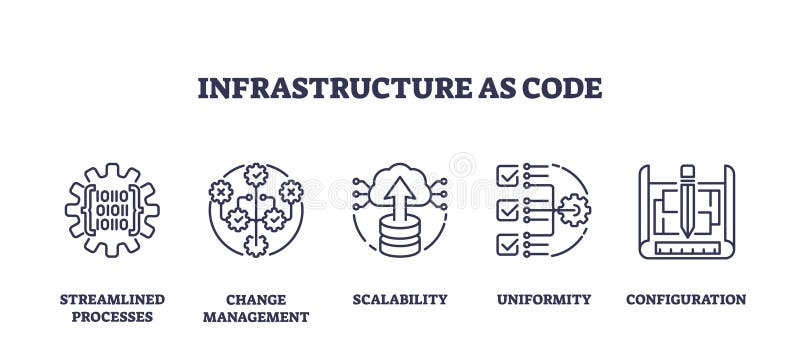
Free with trial Infrastructure as code for data center management outline icons collection set. Labeled elements with IoC streamlined processes, change management, uniformity and configuration vector illustration. Code deploy vectors Infrastructure as code for data center management outline icons collection. Set. Labeled elements with IoC streamlined processes, change management, uniformity. Infrastructure as code for data center management outline icons collection set. Labeled elements with IoC streamlined processes, change management, uniformity and configuration vector illustration.
Free with trial DevOps cycle plan, code, build, test, deploy in pixel art style, workflow vector illustration. Flat vector illustration. Code deploy vectors DevOps cycle plan. Code, build, test, deploy in pixel art style, workflow vector illustration. Flat vector illustration
Free with trial Software development, team work on digital project and code, productivity of developer skills color icon set. Bug and algorithm test, pattern data system and timeline flat elements vector illustration. Code deploy vectors Software development, team work on digital project and code, productivity color icon set. Software development, team work on digital project and code. Software development, team work on digital project and code, productivity of developer skills color icon set. Bug and algorithm test, pattern data system and timeline flat elements vector illustration
Free with trial Software development, team work on digital project and code, productivity of developer skills color icon set. Bug and algorithm test, pattern data system and timeline flat elements vector illustration. Code deploy illustrations Software development, team work on digital project and code, productivity color icon set. Software development, team work on digital project and code. Software development, team work on digital project and code, productivity of developer skills color icon set. Bug and algorithm test, pattern data system and timeline flat elements vector illustration
Free with trial Software development icon made with binary code in wireframe hand. Agile development optimization. Software development practices methodology. Devops. Digital code background with digits 1, 0. Vector. Code deploy illustrations Software development icon made with binary code in wireframe hand. Agile development optimization. Software development practices. Methodology. Devops. Digital. Software development icon made with binary code in wireframe hand. Agile development optimization. Software development practices methodology. Devops. Digital code background with digits 1, 0. Vector
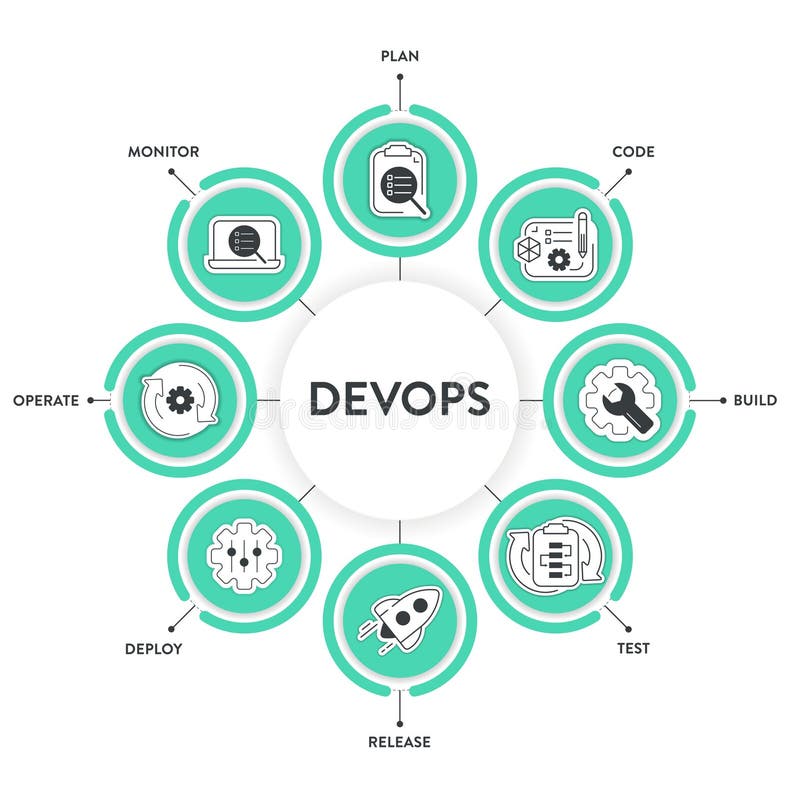
Free with trial Circular diagram depicting DevOps cycle with stages like plan code build test release deploy operate and monitor using icons. Code deploy illustrations DevOps Lifecycle Diagram Illustrating Key Process Stages. Circular diagram depicting DevOps cycle with stages like plan code build test release deploy operate. Circular diagram depicting DevOps cycle with stages like plan code build test release deploy operate and monitor using icons
Free with trial Laptop screen displaying code with gear icon and lines of text, symbolizing configuration and system setup, modern flat. Code deploy vectors Code setup illustration. Developer interface with settings. Laptop screen displaying code with gear icon and lines of text, symbolizing configuration and system. Laptop screen displaying code with gear icon and lines of text, symbolizing configuration and system setup, modern flat
Free with trial Software line icon. Halftone dotted pattern. Gradient icon with grain shadow. Code deployment sign. Develop application symbol. Line software icon. Various designs. Vector. Code deploy vectors Software line icon. Code deployment sign. Halftone dotted pattern. Vector. Software line icon. Halftone dotted pattern. Gradient icon with grain shadow. Code. Software line icon. Halftone dotted pattern. Gradient icon with grain shadow. Code deployment sign. Develop application symbol. Line software icon. Various designs. Vector
Free with trial Coding line icon pack featuring 15 outline style technology and programming symbols including code browser window terminal deploy script source code debug algorithm database server and version control icons on white background ideal for design apps websites and developer tools. Code deploy vectors Coding Line Icon Pack with 15 Outline Programming and Developer Technology Symbols for and Web Design. Coding line icon pack featuring 15 outline style. Coding line icon pack featuring 15 outline style technology and programming symbols including code browser window terminal deploy script source code debug algorithm database server and version control icons on white background ideal for design apps websites and developer tools
Free with trial 3D rendered code programming icon with HTML bracket symbols in yellow and blue on dark card, white background. Perfect for developer, web design, tech themes. Code deploy illustrations 3D Code Programming Icon Dark Navy Yellow Blue HTML Tag Symbol Transparent Background. 3D rendered code programming icon with HTML bracket symbols in yellow and. 3D rendered code programming icon with HTML bracket symbols in yellow and blue on dark card, white background. Perfect for developer, web design, tech themes
Free with trial Streamline software development workflows with automated code testing protocols, rigorous quality assurance, and instant system error resolution tools. Code deploy vectors Software Code Testing Quality Assurance and System Error Resolution Process. Streamline software development workflows with automated code testing protocols. Streamline software development workflows with automated code testing protocols, rigorous quality assurance, and instant system error resolution tools
Free with trial A vibrant, 3D illustration showcasing the software development lifecycle, featuring interconnected stages of coding, building, testing, deploying, and monitoring, with colorful blocks and icons representing each phase in a modern, streamlined design. The image emphasizes the flow and integration of these processes in a professional, technology-focused environment. Code deploy illustrations Software Development Lifecycle Illustration with Code, Build, Test, Deploy, and Monitor Stages. A vibrant, 3D illustration showcasing the software development. A vibrant, 3D illustration showcasing the software development lifecycle, featuring interconnected stages of coding, building, testing, deploying, and monitoring, with colorful blocks and icons representing each phase in a modern, streamlined design. The image emphasizes the flow and integration of these processes in a professional, technology-focused environment
Free with trial Illustration of a tech environment with diverse professionals collaborating on digital projects. Features include a large tablet displaying app interfaces, coding on computer screens, and flowcharts depicting design, code, test, and deploy stages. Decor includes server stacks, gears, a rocket symbolizing innovation, and light bulbs for ideas, all set against a backdrop of a city skyline viewed through windows. The scene symbolizes modern software development and teamwork in a tech-driven workspace. Code deploy illustrations Hills visible on the horizon. The scene conveys a sense of tranquility. Illustration of a tech environment with diverse professionals collaborating on digital. Illustration of a tech environment with diverse professionals collaborating on digital projects. Features include a large tablet displaying app interfaces, coding on computer screens, and flowcharts depicting design, code, test, and deploy stages. Decor includes server stacks, gears, a rocket symbolizing innovation, and light bulbs for ideas, all set against a backdrop of a city skyline viewed through windows. The scene symbolizes modern software development and teamwork in a tech-driven workspace.
Free with trial Branching growing source code illustration commit merge, push clone, fork diff branching growing source code. Code deploy illustrations Branching growing source code. Illustration commit merge, push clone, fork diff AI generated. branching growing source code illustration commit merge, push clone, fork diff branching growing source code
Free with trial A futuristic digital network hologram overlays an office floor, illustrating an intricate automation pipeline with nodes for code, test, deploy, and monitor. This visual represents abstract concepts of AI, data flow, and system integration in a modern workspace. Code deploy illustrations Digital network hologram visualizes complex automation pipeline on office floor. A futuristic digital network hologram overlays an office floor, illustrating an. A futuristic digital network hologram overlays an office floor, illustrating an intricate automation pipeline with nodes for code, test, deploy, and monitor. This visual represents abstract concepts of AI, data flow, and system integration in a modern workspace
Free with trial A dark background features a simplistic white line drawing of a rocket taking off, encased within code brackets. A blue flame signifies motion beneath the rocket. Below the illustration, the phrase "SHIP IT" is boldly printed in white capital letters. The design appears modern and is likely intended as an emblem for developers or tech enthusiasts, symbolizing the deployment or launching of a project. Code deploy vectors Ship It Developer Rocket Launch Inside Code Brackets Sticker on Dark Background — AI Generated. A dark background features a simplistic white line drawing of a. A dark background features a simplistic white line drawing of a rocket taking off, encased within code brackets. A blue flame signifies motion beneath the rocket. Below the illustration, the phrase "SHIP IT" is boldly printed in white capital letters. The design appears modern and is likely intended as an emblem for developers or tech enthusiasts, symbolizing the deployment or launching of a project.
Free with trial Showing terminal console with code, left PASSlist red-pointer, IP-panel, 8. 80,-113. 30, grid-floor. Interface, dashboard, neon, futuristic, cyberpunk, monospaced, debugging. Code deploy illustrations Showing terminal console with code, left PASSlist red-pointer, IP-panel, 8. 80,-113.30, grid-floor. Interface, dashboard, neon, futuristic, cyberpunk
Free with trial Developer working on artificial intelligence and DevOps with HTML code displayed on screens, showcasing technology and programming concepts in action Gluon. Code deploy illustrations Developer working on artificial intelligence and DevOps with HTML code displayed on screens, showcasing technology and. Programming concepts in action Gluon
Free with trial This image illustrates the key stages of the DevOps lifecycle and software development process. Eight distinct steps are visually represented: Plan, Code, Build, Test, Release, Deploy, Operate, and Monitor. Each step is accompanied by a relevant icon, making it easy to understand and identify. The image is ideal for presentations, educational materials, and marketing content related to software development, DevOps, and IT. Code deploy vectors DevOps lifecycle, software development process, and deployment stages. This image illustrates the key stages of the DevOps lifecycle and software development. This image illustrates the key stages of the DevOps lifecycle and software development process. Eight distinct steps are visually represented: Plan, Code, Build, Test, Release, Deploy, Operate, and Monitor. Each step is accompanied by a relevant icon, making it easy to understand and identify. The image is ideal for presentations, educational materials, and marketing content related to software development, DevOps, and IT.
Free with trial Programming growing code snippet illustration development software, algorithm function, loop array programming growing code snippet. Code deploy illustrations Programming growing code snippet. Illustration development software, algorithm function, loop array AI generated. programming growing code snippet illustration development software, algorithm function, loop array programming growing code snippet
Free with trial Clone loading source code illustration push pull, branch merge, fork issue clone loading source code. Code deploy illustrations Clone loading source code. Illustration push pull, branch merge, fork issue AI generated. clone loading source code illustration push pull, branch merge, fork issue clone loading source code
Free with trial Diagram illustrating a developer workflow labeled "Idea to Demo" on a dark background. Features a blue star icon at the top, followed sequentially by white code tags, a cube, and a blue play button at the bottom. The icons are connected by dashed lines, representing stages in the development process. The use of minimalistic design and contrasting colors enhances clarity, focusing on the conceptual flow from idea generation to execution. Code deploy vectors Idea To Demo Developer Workflow Icon Diagram with Code Tag and Play Button on Dark Background — AI Generated. Diagram illustrating a developer workflow labeled. Diagram illustrating a developer workflow labeled "Idea to Demo" on a dark background. Features a blue star icon at the top, followed sequentially by white code tags, a cube, and a blue play button at the bottom. The icons are connected by dashed lines, representing stages in the development process. The use of minimalistic design and contrasting colors enhances clarity, focusing on the conceptual flow from idea generation to execution.
Free with trial Error glitching source code illustration crash debug, fix patch, compile syntax error glitching source code. Code deploy illustrations Error glitching source code. Illustration crash debug, fix patch, compile syntax AI generated. error glitching source code illustration crash debug, fix patch, compile syntax error glitching source code
Free with trial Debug glitch-transitioning source code illustration compile syntax, algorithm variable, loop function debug glitch-transitioning source code. Code deploy illustrations Debug glitch-transitioning source code. Illustration compile syntax, algorithm variable, loop function AI generated. debug glitch-transitioning source code illustration compile syntax, algorithm variable, loop function debug glitch-transitioning source code
Free with trial Extract splitting code snippet illustration simplify optimize, divide segment, partition isolate extract splitting code snippet. Code deploy illustrations Extract splitting code snippet. Illustration simplify optimize, divide segment, partition isolate AI generated. extract splitting code snippet illustration simplify optimize, divide segment, partition isolate extract splitting code snippet
Free with trial Algorithm growing code snippet illustration function loop, array object, class method algorithm growing code snippet. Code deploy illustrations Algorithm growing code snippet. Illustration function loop, array object, class method AI generated. algorithm growing code snippet illustration function loop, array object, class method algorithm growing code snippet
Free with trial Displaying red terminal showing credentials table, code logs, hex dump, charts on dashboard. Cybersecurity, dataanalysis, technological, digital, analytical, monitoring, interface. Code deploy illustrations Displaying red terminal showing credentials table, code logs, hex dump, charts on dashboard. Cybersecurity, dataanalysis, technological, digital, analytical
Free with trial A person in a suit interacts with a futuristic digital interface displaying DevOps elements. The screens show system health, deployment status, and a CI CD pipeline. The pipeline includes stages like code, build, test, deploy, and monitor. Each section is highlighted with icons and progress indicators, emphasizing efficiency and continuous integration in software development. The overall theme focuses on technology and process management. Code deploy illustrations Professional DevOps Engineer Managing Software Development and IT Operations Systems. A person in a suit interacts with a futuristic digital interface displaying. A person in a suit interacts with a futuristic digital interface displaying DevOps elements. The screens show system health, deployment status, and a CI CD pipeline. The pipeline includes stages like code, build, test, deploy, and monitor. Each section is highlighted with icons and progress indicators, emphasizing efficiency and continuous integration in software development. The overall theme focuses on technology and process management.
Free with trial DevOps banner web. concept for software engineering and development with an icon of a plan, code, build, test, release, deploy, operate, and monitor. vector illustration EPS 10. Code deploy vectors DevOps banner web. concept for software engineering and development. With an icon of a plan, code, build, test, release, deploy, operate, and monitor. vector
Free with trial Displaying terminal interface showing code in virtual panel, with code editor window and bar graphs. Cybersecurity, data visualization, digital interface, technology, analytics, information technology, futuristic. Code deploy illustrations Displaying terminal interface showing code in virtual panel, with code editor window and bar graphs. Cybersecurity, data visualization, digital interface
Free with trial Set of thin line icons representing modern technologies. Icons include security (shield), database (stacked disks), settings (gears), code (brackets), deploy (cloud and arrow), debug (magnifying glass), wireless (signal lines), analytics (network nodes), new file (document symbol), speed (lightning bolt), interface (arrow cursor), and versioning (connected dots). Each icon features simple black lines with accents of red, yellow, and teal circles for emphasis. Suitable for tech or IT themed uses. Code deploy vectors Set of thin line icons of modern technologies. Set of thin line icons representing modern technologies. Icons include security (shield), database (stacked disks. Set of thin line icons representing modern technologies. Icons include security (shield), database (stacked disks), settings (gears), code (brackets), deploy (cloud and arrow), debug (magnifying glass), wireless (signal lines), analytics (network nodes), new file (document symbol), speed (lightning bolt), interface (arrow cursor), and versioning (connected dots). Each icon features simple black lines with accents of red, yellow, and teal circles for emphasis. Suitable for tech or IT themed uses.
Free with trial Secure SDLC and DevOps pipeline visualized with stages: Plan, Requirements, Design, Develop, Test, Deploy, Monitor. Includes threat modeling, code scanning, and continuous security metrics. Code deploy illustrations Secure software development lifecycle and devops pipeline for continuous security and compliance. Secure SDLC and DevOps pipeline visualized with stages: Plan. Secure SDLC and DevOps pipeline visualized with stages: Plan, Requirements, Design, Develop, Test, Deploy, Monitor. Includes threat modeling, code scanning, and continuous security metrics
Free with trial Algorithm growing code snippet illustration function loop, array object, class method algorithm growing code snippet. Code deploy illustrations Algorithm growing code snippet. Illustration function loop, array object, class method AI generated. algorithm growing code snippet illustration function loop, array object, class method algorithm growing code snippet
Free with trial Programming melting source code illustration software development, algorithm compile, syntax repository programming melting source code. Code deploy illustrations Programming melting source code. Illustration software development, algorithm compile, syntax repository AI generated. programming melting source code illustration software development, algorithm compile, syntax repository programming melting source code
Free with trial This diagram shows the different stages involved in software development and deployment, including code, test, plan, deploy, build, release, monitor, and operate. It provides a visual representation of the software development lifecycle, highlighting the key steps and processes involved in creating and delivering software applications. Code deploy vectors A diagram illustrating the stages of software development and deployment. This diagram shows the different stages involved in software development and deployment. This diagram shows the different stages involved in software development and deployment, including code, test, plan, deploy, build, release, monitor, and operate. It provides a visual representation of the software development lifecycle, highlighting the key steps and processes involved in creating and delivering software applications
Free with trial Clean protection icon with shield and code symbol representing secure software development programming safety system protection and reliable digital application environment. Code deploy vectors Code shield programming protection software security system safe development concept for digital use. Clean protection icon with shield and code symbol. Clean protection icon with shield and code symbol representing secure software development programming safety system protection and reliable digital application environment
Free with trial A laptop screen shows an AI coding assistant interface, featuring various visual elements like a large "AI" chip icon, progress bars, and colorful coding lines. The interface includes sections for code suggestions, error detection, documentation, code refactoring, and optimization. A sidebar displays project structure and code quality metrics. The bottom contains interactive buttons labeled "Analyze," "Suggest," "Generate," "Test," and "Deploy. " A person with a suit types on the keyboard. The setup presents a futuristic digital workspace emphasizing AI's role in software development. Code deploy illustrations AI Coding Assistant for Software Development with Machine Learning Code and Intelligent Programming Tools. A laptop screen shows an AI coding assistant interface. A laptop screen shows an AI coding assistant interface, featuring various visual elements like a large "AI" chip icon, progress bars, and colorful coding lines. The interface includes sections for code suggestions, error detection, documentation, code refactoring, and optimization. A sidebar displays project structure and code quality metrics. The bottom contains interactive buttons labeled "Analyze," "Suggest," "Generate," "Test," and "Deploy." A person with a suit types on the keyboard. The setup presents a futuristic digital workspace emphasizing AI's role in software development.
Free with trial Development melting source code illustration algorithm compile, syntax repository, version control development melting source code. Code deploy illustrations Development melting source code. Illustration algorithm compile, syntax repository, version control AI generated. development melting source code illustration algorithm compile, syntax repository, version control development melting source code
Free with trial A collection of icons related to software development, user experience, and human interaction, including code, debug, deploy, testing, and usability test icons, presented in a clean and modern design. Code deploy illustrations Software Development and User Experience Icons. A collection of icons related to software development, user experience, and human interaction, including code. A collection of icons related to software development, user experience, and human interaction, including code, debug, deploy, testing, and usability test icons, presented in a clean and modern design.
Free with trial Debug glitching source code illustration fix patch, compile syntax, runtime exception debug glitching source code. Code deploy illustrations Debug glitching source code. Illustration fix patch, compile syntax, runtime exception AI generated. debug glitching source code illustration fix patch, compile syntax, runtime exception debug glitching source code
Free with trial Software melting source code illustration development algorithm, compile syntax, repository version software melting source code. Code deploy illustrations Software melting source code. Illustration development algorithm, compile syntax, repository version AI generated. software melting source code illustration development algorithm, compile syntax, repository version software melting source code
Free with trial A flat vector icon set displays code brackets terminal bug gears git branch and rocket designed for app interfaces web headers and developer documentation minimalist. Generative AI. Code deploy vectors Flat design developer icon set close up code terminal bug gears git branch rocket minimalist black on white vector outline. A flat vector icon set displays code. A flat vector icon set displays code brackets terminal bug gears git branch and rocket designed for app interfaces web headers and developer documentation minimalist. Generative AI
Free with trial Sixteen technology icons each representing a different aspect of software development. The icons include code editor JavaScript version control deploy debugging terminal REST API cloud infrastructure SQL database container automated testing cybersecurity team collaboration agile workflow framework and server management. Each icon is contained within a rounded rectangle with a dark background using a palette of blue orange and white. The style is minimalistic and modern focusing on tech functionality and processes. Code deploy illustrations The style is minimalistic and modern focusing on tech functionalit. Sixteen technology icons each representing a different aspect of software development. The. Sixteen technology icons each representing a different aspect of software development. The icons include code editor JavaScript version control deploy debugging terminal REST API cloud infrastructure SQL database container automated testing cybersecurity team collaboration agile workflow framework and server management. Each icon is contained within a rounded rectangle with a dark background using a palette of blue orange and white. The style is minimalistic and modern focusing on tech functionality and processes.
Free with trial This image was created using Generative AI. DevOps workflow with eight phases: code, build, test, deploy, monitor, plan, operate, continuous improvement. Code deploy vectors DevOps concept with eight phases workflow. This image was created using Generative AI. DevOps workflow with eight phases: code, build, test, deploy, monitor. This image was created using Generative AI. DevOps workflow with eight phases: code, build, test, deploy, monitor, plan, operate, continuous improvement
Free with trial Software line icon. Continuous line big heart. Code deployment sign. Develop application symbol. 3d hearts in heart shaped loop. Software single line ribbon. Loop curve pattern. Vector. Code deploy vectors Software line icon. Code deployment sign. Continuous line big heart. Vector. Software line icon. Continuous line big heart. Code deployment sign. Develop. Software line icon. Continuous line big heart. Code deployment sign. Develop application symbol. 3d hearts in heart shaped loop. Software single line ribbon. Loop curve pattern. Vector
Free with trial A clean, grid-based infographic presents nine colorful icons illustrating stages of a software development workflow: code submission, review, requested changes, feedback, approval, and merge or deployment, with feedback, approval, and merge deploy shown twice in different styles. Document symbols with code brackets, a magnifying glass, an exclamation mark, check marks, speech bubbles, and branching arrows distinguish each stage against a white background. Thin gray dividers and bold black labels organize the panels, while blue, yellow, red, orange, green, and purple accents make the process easy to scan. Code deploy vectors Code Lifecycle Icons Software Development Workflow With Code Submission. A clean, grid-based infographic presents nine colorful icons illustrating stages of a. A clean, grid-based infographic presents nine colorful icons illustrating stages of a software development workflow: code submission, review, requested changes, feedback, approval, and merge or deployment, with feedback, approval, and merge deploy shown twice in different styles. Document symbols with code brackets, a magnifying glass, an exclamation mark, check marks, speech bubbles, and branching arrows distinguish each stage against a white background. Thin gray dividers and bold black labels organize the panels, while blue, yellow, red, orange, green, and purple accents make the process easy to scan.
Free with trial Programming and coding, application and software development, bug testing, program code optimization color icon set. Algorithm and portfolio idea of developer, cloud system flat vector illustration. Code deploy vectors Programming and coding, software development and bug testing, program code color icon set. Programming and coding, application and software development, bug. Programming and coding, application and software development, bug testing, program code optimization color icon set. Algorithm and portfolio idea of developer, cloud system flat vector illustration
Free with trial A set of colorful and creative stickers themed around programming, coding, software development, and computer science. Features icons, motivational quotes like 'Code Life', 'Bug Hunting', 'Coffee Code', 'Secure Apps', 'Deploy Done', and 'Learn Build Grow'. Ideal for web design, tech blogs, developer branding, stickers, badges, and educational materials related to computer programming. Code deploy illustrations Set of modern programming and software development stickers. A set of colorful and creative stickers themed around programming, coding, software development, and. A set of colorful and creative stickers themed around programming, coding, software development, and computer science. Features icons, motivational quotes like 'Code Life', 'Bug Hunting', 'Coffee Code', 'Secure Apps', 'Deploy Done', and 'Learn Build Grow'. Ideal for web design, tech blogs, developer branding, stickers, badges, and educational materials related to computer programming.
 Sign in