Free with trial Vector icon of a gear or cogwheel, symbolizing settings, configuration, mechanics, engineering, and system control. Perfect for user interfaces, software apps, industrial tools, technical services, and machine-related visuals. Clean, modern, and scalable for both digital and print use. Interface function vectors Gear Cogwheel Settings Mechanic Icon. Vector icon of a gear or cogwheel, symbolizing settings, configuration, mechanics, engineering, and system control. Perfect. Vector icon of a gear or cogwheel, symbolizing settings, configuration, mechanics, engineering, and system control. Perfect for user interfaces, software apps, industrial tools, technical services, and machine-related visuals. Clean, modern, and scalable for both digital and print use.
Free with trial A modern, minimalist icon featuring a black square with rounded corners. A stylized white 'X' symbol, with a subtle 3D effect and soft shadow, is prominently displayed in the center, intersecting itself. The icon is presented on a white background, suggesting a function like closing, canceling, or indicating an error. Interface function illustrations Black Square Icon with White Intersecting \' X\' Symbol and Shadow cross cancel. A modern, minimalist icon featuring a black square with rounded corners. A. A modern, minimalist icon featuring a black square with rounded corners. A stylized white 'X' symbol, with a subtle 3D effect and soft shadow, is prominently displayed in the center, intersecting itself. The icon is presented on a white background, suggesting a function like closing, canceling, or indicating an error
Free with trial A clean, flat design illustration of a dark gray computer keyboard with white keys. The keyboard features a standard QWERTY layout, numeric keys, and function keys. A dark gray cable extends from the top of the keyboard. The image is presented on a white background, emphasizing its simplicity and modern aesthetic. This graphic is ideal for representing technology, input devices, typing, and digital communication in various design projects. Interface function illustrations Minimalist Flat Keyboard Icon. A clean, flat design illustration of a dark gray computer keyboard with white keys. The keyboard features a standard QWERTY layout. A clean, flat design illustration of a dark gray computer keyboard with white keys. The keyboard features a standard QWERTY layout, numeric keys, and function keys. A dark gray cable extends from the top of the keyboard. The image is presented on a white background, emphasizing its simplicity and modern aesthetic. This graphic is ideal for representing technology, input devices, typing, and digital communication in various design projects.
Free with trial A detailed view of a robotic hand featuring numerous joints, sensors, and intricate mechanisms. The futuristic design suggests potential use in medicine, research, and manufacturing. Interface function illustrations Advanced robotic hand showcasing intricate design and technology for future applications in various fields. A detailed view of a robotic hand featuring numerous. A detailed view of a robotic hand featuring numerous joints, sensors, and intricate mechanisms. The futuristic design suggests potential use in medicine, research, and manufacturing
Free with trial Minimalist Black Silhouette Setting Gear Cog Automation Process Sign Icon. Interface function vectors Minimalist black gear mechanism icon surrounded by connection nodes representing digital automation and operations isolated on a. Minimalist Black Silhouette. Minimalist Black Silhouette Setting Gear Cog Automation Process Sign Icon
Free with trial A stylized 3D illustration of a computer screen showing gears and tools, representing settings and configuration. Interface function illustrations 3d rendered computer screen displaying gears and tools for settings. A stylized 3D illustration of a computer screen showing gears and tools, representing. A stylized 3D illustration of a computer screen showing gears and tools, representing settings and configuration
Free with trial A close-up shot captures a person's finger pressing the eject button on a sleek, silver electronic device. The action is clear against a clean white background, highlighting user interaction. Interface function illustrations Close-up of Finger Pressing Eject Button on Modern Silver Media Player. A close-up shot captures a person's finger pressing the eject button on a sleek, silver. A close-up shot captures a person's finger pressing the eject button on a sleek, silver electronic device. The action is clear against a clean white background, highlighting user interaction
Free with trial Projecting holographic code panels and code text floating in digital void, showing syntax elements. Futuristic, technology, visualization, immersive, digital, abstract, innovation. Interface function illustrations Projecting holographic code panels and code text floating in digital void, showing syntax elements. Futuristic, technology, visualization, immersive, digital
Free with trial Clean, modern digital icon representing adding new items or utility in apps and interfaces. A simple, functional symbol for design projects. Interface function vectors Modern digital icon adds utility and simplicity to apps and interfaces. Clean, modern digital icon representing adding new items or utility in apps and. Clean, modern digital icon representing adding new items or utility in apps and interfaces. A simple, functional symbol for design projects
Free with trial Close-up of a modern digital alarm clock face, featuring a glowing snooze button and illuminated clock hands. Generative AI. Interface function illustrations Digital Alarm Clock with Illuminated Snooze Button Glowing Warmly. Close-up of a modern digital alarm clock face, featuring a glowing snooze button and. Close-up of a modern digital alarm clock face, featuring a glowing snooze button and illuminated clock hands. Generative AI
Free with trial A simple black icon depicting a plus sign contained within a clean oval shape, serving as a general add or create button. This classic design is versatile for various user interfaces, forms, or applications where a straightforward and universally recognizable addition function is needed, offering a softer alternative to rectangular buttons. Adaptable and clear, vector design Generative AI. Interface function vectors Plus sign in oval, general add button, vector design Generative AI. A simple black icon depicting a plus sign contained within a clean oval shape, serving as a. A simple black icon depicting a plus sign contained within a clean oval shape, serving as a general add or create button. This classic design is versatile for various user interfaces, forms, or applications where a straightforward and universally recognizable addition function is needed, offering a softer alternative to rectangular buttons. Adaptable and clear, vector design Generative AI
Free with trial Mental clarity, cognitive support, digital therapy, data processing, cloud solutions, neural networks. Hand untangling a brain connecting to digital content. Mental clarity and digital therapy. Interface function illustrations Hand Untangling Brain Illustration Connected to Digital Interface and Cloud. Mental clarity, cognitive support, digital therapy, data processing, cloud solutions. Mental clarity, cognitive support, digital therapy, data processing, cloud solutions, neural networks. Hand untangling a brain connecting to digital content. Mental clarity and digital therapy
Free with trial High-quality image of a modern gray metallic power switch in the off position, sleek design ideal for technology and control concepts. Interface function vectors Power switch on off button isolated gray metallic control toggle. High-quality image of a modern gray metallic power switch in the off position, sleek design. High-quality image of a modern gray metallic power switch in the off position, sleek design ideal for technology and control concepts
Free with trial Stylized red and grey power button icon with surrounding signal lines. AI generated. Interface function vectors Stylized red and grey power button icon with surrounding signal lines. AI generated
Free with trial A modern and clean toggle switch graphic, illustrating the on and off states with distinct visual cues. Isolated on a white background for versatile use in digital interfaces and presentations. Interface function illustrations Toggle switch for on and off isolated on white background. A modern and clean toggle switch graphic, illustrating the on and off states with distinct visual cues. A modern and clean toggle switch graphic, illustrating the on and off states with distinct visual cues. Isolated on a white background for versatile use in digital interfaces and presentations
Free with trial Media icon. Control arrow symbols. Green circle shape. Black background. EPS 10. Interface function vectors Media icon. Control arrow symbols. Green circle shape. Black background. EPS 10
Free with trial A digital power button icon glowing with intense orange and yellow hues against a dark backdrop. This symbol represents starting up shutting down or standby modes. Interface function vectors Glowing power button symbol emitting fiery orange light in darkness. A digital power button icon glowing with intense orange and yellow hues against a dark. A digital power button icon glowing with intense orange and yellow hues against a dark backdrop. This symbol represents starting up shutting down or standby modes
Free with trial Hand Gestures and Click Icons in Minimal Style Hand Gestures and Click Icons in Minimal Style. Interface function vectors Hand Gestures and Click Icons in Minimal Style. Hand Gestures and Click Icons in Minimal Style Hand Gestures and Click Icons in Minimal Style
Free with trial The image shows a sleek, modern remote control device featuring a combination of silver and bright pink accents. The device has a circular navigation pad in pink and a smaller circular button below it, likely for a menu or home function. The design appears ergonomic and compact, suitable for easy handling. Interface function illustrations Stylish remote control device with pink and silver color scheme. The image shows a sleek, modern remote control device featuring a combination of silver and. The image shows a sleek, modern remote control device featuring a combination of silver and bright pink accents. The device has a circular navigation pad in pink and a smaller circular button below it, likely for a menu or home function. The design appears ergonomic and compact, suitable for easy handling
Free with trial This image shows a sleek, minimalist play button in white positioned centrally on a circular blue background. The button has a rounded triangle shape, indicating a media playback function, and the overall design is clean and modern. Interface function illustrations Modern play button on a circular blue background isolated on white background. This image shows a sleek, minimalist play button in white positioned centrally on. This image shows a sleek, minimalist play button in white positioned centrally on a circular blue background. The button has a rounded triangle shape, indicating a media playback function, and the overall design is clean and modern
Free with trial Gear outline icon providing a visual symbol for technical systems, engineering processes, and adjustable configurations, perfect for concepts of development, management, and technology. Interface function vectors Gear icon representing industrial settings and mechanical support. Gear outline icon providing a visual symbol for technical systems, engineering processes, and. Gear outline icon providing a visual symbol for technical systems, engineering processes, and adjustable configurations, perfect for concepts of development, management, and technology
Free with trial A sleek collection of polished golden digital media player control icons, featuring play, pause, stop, volume, camera, download, and search symbols, perfect for a modern user. Interface function vectors A sleek collection of polished golden digital media player contro. L icons, featuring play, pause, stop, volume, camera, download, and search symbols, perfect
Free with trial A clean, flat design illustration of a battery icon. The battery is depicted with a teal border and a light yellow interior. A diagonal line divides the interior into two sections: one orange and one light yellow. A bold, black plus symbol is prominently displayed on the light yellow section, indicating a positive charge or power source. This graphic is ideal for representing concepts related to energy, power, charging, electricity, and technology in a simple, modern style. Interface function illustrations Battery Icon with Plus Symbol - Flat Design. A clean, flat design illustration of a battery icon. The battery is depicted with a teal border and a light yellow. A clean, flat design illustration of a battery icon. The battery is depicted with a teal border and a light yellow interior. A diagonal line divides the interior into two sections: one orange and one light yellow. A bold, black plus symbol is prominently displayed on the light yellow section, indicating a positive charge or power source. This graphic is ideal for representing concepts related to energy, power, charging, electricity, and technology in a simple, modern style.
Free with trial An abstract, minimalist electronic control panel presented on a white surface. It features a row of five black square buttons, a circular black dial with a silver ring, and several gold-colored geometric shapes resembling arrows or indicators. The composition is clean and modern, set against a white background with soft shadows. Interface function illustrations Abstract Electronic Control Panel with Black and Gold Buttons on White Background technology. An abstract, minimalist electronic control panel presented on a. An abstract, minimalist electronic control panel presented on a white surface. It features a row of five black square buttons, a circular black dial with a silver ring, and several gold-colored geometric shapes resembling arrows or indicators. The composition is clean and modern, set against a white background with soft shadows
Free with trial Gray download button with bold black font and green edge features a downward arrow symbol for clarity. Interface function vectors Download button with arrow symbol featuring a green edge for emphasis. Gray download button with bold black font and green edge features a downward arrow symbol. Gray download button with bold black font and green edge features a downward arrow symbol for clarity.
Free with trial A close-up shot shows a finger pressing a glowing yellow 'SET' button on a control panel. Nearby are illuminated red 'READY' and green 'GO' buttons, suggesting activation. Interface function illustrations Close-up finger pressing illuminated yellow \'\'ready\' and green \'go\' buttons. A close-up shot shows a finger pressing a glowing yellow 'SET' button on a. A close-up shot shows a finger pressing a glowing yellow 'SET' button on a control panel. Nearby are illuminated red 'READY' and green 'GO' buttons, suggesting activation
Free with trial Close-up view of a vintage control panel featuring colorful buttons and dials, showcasing unique details and textures in an industrial setting. Interface function illustrations Vintage Control Panel with Colorful Buttons and Dials in Dim Light. Close-up view of a vintage control panel featuring colorful buttons and dials, showcasing. Close-up view of a vintage control panel featuring colorful buttons and dials, showcasing unique details and textures in an industrial setting
Free with trial Professional eject symbol set for media player hardware device removal storage disk and playback control actions in modern digital entertainment systems. Interface function vectors Eject Media Icon Collection in Outline and Solid Style for Playback and Device Control Systems. Professional eject symbol set for media player hardware device. Professional eject symbol set for media player hardware device removal storage disk and playback control actions in modern digital entertainment systems
Free with trial The image features a detailed close up of brightly colored syntax highlighting against a deep black background, typical of modern programming environments. This visual representation captures the complexity and focus required in software engineering. Rendered by Ai, the display shows various lines of Java and JavaScript components, indicating active coding work. The screen glow emphasizes the. Interface function illustrations Programming code on screen with cursor visible. The image features a detailed close up of brightly colored syntax highlighting against a deep black background. The image features a detailed close up of brightly colored syntax highlighting against a deep black background, typical of modern programming environments. This visual representation captures the complexity and focus required in software engineering. Rendered by Ai, the display shows various lines of Java and JavaScript components, indicating active coding work. The screen glow emphasizes the
Free with trial The image shows a circular blue object, likely a button or badge, with a white label in the center. The label contains an icon resembling a document or note, possibly indicating a function related to files, reminders, or notifications. The design is sleek and modern, suggesting it might be part of a tech gadget or smart home device. Interface function illustrations A circular blue device with a white label featuring a document icon. The image shows a circular blue object, likely a button or badge, with a white label in the. The image shows a circular blue object, likely a button or badge, with a white label in the center. The label contains an icon resembling a document or note, possibly indicating a function related to files, reminders, or notifications. The design is sleek and modern, suggesting it might be part of a tech gadget or smart home device
Free with trial A detailed view of a vintage control panel featuring colorful buttons and dials, showcasing a blend of retro style and modern functionality for various equipment. Interface function illustrations Retro-Control Panel with Colorful Buttons and Dials for Equipment. A detailed view of a vintage control panel featuring colorful buttons and dials, showcasing a. A detailed view of a vintage control panel featuring colorful buttons and dials, showcasing a blend of retro style and modern functionality for various equipment
Free with trial Modern flat vector illustration with clean lines and bold shapes. Minimalist composition, high contrast color palette, and scalable design. Perfect for branding, social media, posters, merchandise, stickers, and digital assets. Interface function vectors Collection of Human Interaction Icons with Technology and Devices. Modern flat vector illustration with clean lines and bold shapes. Minimalist composition, high. Modern flat vector illustration with clean lines and bold shapes. Minimalist composition, high contrast color palette, and scalable design. Perfect for branding, social media, posters, merchandise, stickers, and digital assets
Free with trial A polished vector illustration of a magnifying glass with a minus symbol, signifying a zoom out or reduce function. This clear icon is ideal for user interfaces, map applications, or tools where decreasing detail or scale is needed for navigation, vector design Generative AI. Interface function vectors Magnifying Glass with Minus Icon for Zoom Out or Reduce Feature, vector design Generative AI. A polished vector illustration of a magnifying glass with a minus. A polished vector illustration of a magnifying glass with a minus symbol, signifying a zoom out or reduce function. This clear icon is ideal for user interfaces, map applications, or tools where decreasing detail or scale is needed for navigation, vector design Generative AI
Free with trial Energy solutions, time management, utility tools, technology, work processes, modern design. Wall socket, clock with arrow nozzle. Energy solutions and time management. Interface function vectors Electrical Plug, Wall Socket, Clock with Arrow, and Nozzle, Modern Icon Set Energy, Time, and Technology Concepts. Energy solutions, time management, utility. Energy solutions, time management, utility tools, technology, work processes, modern design. Wall socket, clock with arrow nozzle . Energy solutions and time management
Free with trial Brain with Blue and Pink Wiring. Isolated on Transparent Background. Interface function illustrations Brain with Blue and Pink Wiring. Isolated on Transparent Background
Free with trial AI chatbot interacts on laptop screen with speech bubbles, emotions, and workflow icons. Ideal for automation, customer service, productivity, technology, communication, workflow simple landing page. Interface function vectors AI Chatbot Assisting with Communication, Workflow, and Customer Support Visualization. AI chatbot interacts on laptop screen with speech bubbles, emotions, and. AI chatbot interacts on laptop screen with speech bubbles, emotions, and workflow icons. Ideal for automation, customer service, productivity, technology, communication, workflow simple landing page
Free with trial A prominent red reset button stands out on a smooth metal panel. The setting appears contemporary, suggesting technological use. This button symbolizes a fresh start or a system reset. Interface function illustrations Large red reset button on a sleek metal surface in a modern setting. A prominent red reset button stands out on a smooth metal panel. The setting appears. A prominent red reset button stands out on a smooth metal panel. The setting appears contemporary, suggesting technological use. This button symbolizes a fresh start or a system reset
Free with trial Close-up view of hands typing on a vintage control panel, showcasing the intricate details of buttons and keys in an industrial workspace. Interface function illustrations Close-Up of Hands on Vintage Control Panel with Keyboard Elements. Close-up view of hands typing on a vintage control panel, showcasing the intricate details of. Close-up view of hands typing on a vintage control panel, showcasing the intricate details of buttons and keys in an industrial workspace
Free with trial A detailed scientific visualization of a cell membrane with embedded protein transporters and glowing particles moving through channels, set against a dark background with floating molecules and light effects. AI-generated. Interface function illustrations Glowing molecular structure with protein channels. A detailed scientific visualization of a cell membrane with embedded protein transporters and glowing. A detailed scientific visualization of a cell membrane with embedded protein transporters and glowing particles moving through channels, set against a dark background with floating molecules and light effects. AI-generated
Free with trial This image features a sleek, round red button with a glossy finish. The button has a white bell icon with an upward arrow symbol inside it, indicating a notification or alert function. Interface function illustrations A modern red button with a white bell icon and upward arrow symbol. This image features a sleek, round red button with a glossy finish. The button has a white. This image features a sleek, round red button with a glossy finish. The button has a white bell icon with an upward arrow symbol inside it, indicating a notification or alert function
Free with trial Technology, connectivity, emotions, teamwork, collaboration, user experience. Gear, cloud and heart icons on a white background. Technology and emotions in a simple design. Interface function vectors Gear Symbol with Cloud and Heart Shapes Technology, Connection, and Emotion Concepts. Technology, connectivity, emotions, teamwork, collaboration, user. Technology, connectivity, emotions, teamwork, collaboration, user experience. Gear, cloud and heart icons on a white background. Technology and emotions in a simple design
Free with trial A 3D rendered icon with a bright orange rounded square background and a white arrow curving upwards and to the right, symbolizing a share or export function. The icon has a smooth, glossy appearance and is isolated on a white background, commonly used in digital interfaces for sharing content or initiating a transfer. Interface function illustrations 3D Orange Share Icon with White Arrow on White Background sharing symbol. A 3D rendered icon with a bright orange rounded square background and a white arrow. A 3D rendered icon with a bright orange rounded square background and a white arrow curving upwards and to the right, symbolizing a share or export function. The icon has a smooth, glossy appearance and is isolated on a white background, commonly used in digital interfaces for sharing content or initiating a transfer
Free with trial A minimalist black and white graphic representing the 'save' function. The design features a stylized floppy disk icon with a prominent downward-pointing arrow integrated into its upper section. The word 'SAVE' is clearly displayed in white text on the face of the disk. This icon is commonly used in software interfaces and digital contexts to indicate the action of saving data or files. Interface function vectors Save Icon with Floppy Disk and Down Arrow. A minimalist black and white graphic representing the 'save' function. The design features a stylized floppy disk icon. A minimalist black and white graphic representing the 'save' function. The design features a stylized floppy disk icon with a prominent downward-pointing arrow integrated into its upper section. The word 'SAVE' is clearly displayed in white text on the face of the disk. This icon is commonly used in software interfaces and digital contexts to indicate the action of saving data or files.
Free with trial Explore a highly detailed render of a futuristic medical device, showcasing advanced technology and innovative design, perfect for healthcare and research visuals. Interface function illustrations Futuristic Medical Device Render Showcasing Innovative Technology. Explore a highly detailed render of a futuristic medical device, showcasing advanced. Explore a highly detailed render of a futuristic medical device, showcasing advanced technology and innovative design, perfect for healthcare and research visuals
Free with trial A futuristic technology device is held in a person's hand, showcasing a high-fidelity 3D render. This innovative tool emphasizes research and technological advancement in a lab setting. Interface function illustrations Futuristic Technology Device in Hand with 3D High-Fidelity Render. A futuristic technology device is held in a person's hand, showcasing a high-fidelity 3D. A futuristic technology device is held in a person's hand, showcasing a high-fidelity 3D render. This innovative tool emphasizes research and technological advancement in a lab setting
Free with trial Close-up view of a mobile phone button detail, highlighting its texture, shape, and functionality,Generative AI. Interface function illustrations Intricate closeup, exploring the detail and texture of a cell phone button closeup. Close-up view of a mobile phone button detail, highlighting its texture. Close-up view of a mobile phone button detail, highlighting its texture, shape, and functionality,Generative AI
Free with trial Minimalist Black Silhouette Cogwheel Mechanism Refresh Arrows Automation System Icon. Interface function vectors Minimalist black silhouette icon featuring a central gear encircled by two rotating arrows representing system update, automation. Minimalist Black Silhouette. Minimalist Black Silhouette Cogwheel Mechanism Refresh Arrows Automation System Icon
Free with trial This image features a stylized blue arrow icon pointing downwards, commonly used in user interfaces to represent a download function, file saving, or indicating direction. The icon is minimalist, consisting of a rectangular top section separated from a triangular bottom section by a thin gap, all set against a plain white background. Interface function illustrations A blue downward pointing arrow icon representing a download action on a clean white background. This image features a stylized blue arrow icon pointing downwards. This image features a stylized blue arrow icon pointing downwards, commonly used in user interfaces to represent a download function, file saving, or indicating direction. The icon is minimalist, consisting of a rectangular top section separated from a triangular bottom section by a thin gap, all set against a plain white background
Free with trial The image shows a pink search bar with rounded edges and a white interior. Inside the search bar, on the right side, there is a magnifying glass icon indicating its function for searching. The search bar is placed on a metallic surface with a blurred background. Interface function illustrations Pink search bar with a magnifying glass icon on a metallic surface. The image shows a pink search bar with rounded edges and a white interior. Inside the search. The image shows a pink search bar with rounded edges and a white interior. Inside the search bar, on the right side, there is a magnifying glass icon indicating its function for searching. The search bar is placed on a metallic surface with a blurred background
Free with trial Power On Off Button Icons. Vol 32031. Interface function illustrations Power On Off Button Icons. Vol 32031
Free with trial A set of stylized web buttons displayed in rows against a black background. Each row features buttons with different color schemes: orange, green, blue, and red. The buttons include symbols for power, stop, play, fast forward, rewind, pause, and record. Each button is square with rounded edges, featuring a glossy design and labeled with the associated function in matching colors. The layout is organized and visually distinct, emphasizing the uniformity of design across different color themes. Interface function vectors A set of stylized web buttons displayed in rows against a black background. Each row features buttons with different color schemes: orange, green, blue, and
Free with trial A square, dark red button with the word DUTY prominently displayed in white, embossed lettering and a decorative, embossed border around the edges. Represents commitment and responsibility. Interface function illustrations Square button with duty text and embossed border. A square, dark red button with the word DUTY prominently displayed in white, embossed lettering and a. A square, dark red button with the word DUTY prominently displayed in white, embossed lettering and a decorative, embossed border around the edges. Represents commitment and responsibility
Free with trial Glossy Minus Icon on a Rustic Wooden Base. A modern and tactile minus sign icon, rendered with a glossy, reflective surface and set within a rustic wooden frame. Interface function vectors Glossy Minus Icon on a Rustic Wooden Base. A modern and tactile minus sign icon, rendered with a glossy, reflective surface and set within a rustic wooden frame
Free with trial This image features a bold, red play button icon, commonly associated with video platforms. The icon is square-shaped with rounded corners and a glossy finish, giving it a modern and appealing look. In the center of the icon, there is a white triangle pointing to the right, symbolizing the play function. Interface function illustrations A vibrant red play button icon with a white triangle in the center. This image features a bold, red play button icon, commonly associated with video platforms. This image features a bold, red play button icon, commonly associated with video platforms. The icon is square-shaped with rounded corners and a glossy finish, giving it a modern and appealing look. In the center of the icon, there is a white triangle pointing to the right, symbolizing the play function
Free with trial A captivating close-up of a glowing blue confirm key on a keyboard symbolizing technology and productivity. Interface function illustrations Glowing blue confirm key on keyboard home office technology image close-up view digital concept. A captivating close-up of a glowing blue confirm key on a. A captivating close-up of a glowing blue confirm key on a keyboard symbolizing technology and productivity
Free with trial Close-up of a control panel featuring a prominent, illuminated blue play button and a red stop button. The panel also includes other function buttons. The image conveys a sense of control, technology, and media production. Suitable for illustrating concepts related to broadcasting, audio video editing, and technological interfaces. Interface function illustrations Control Panel with Illuminated Play Button. Close-up of a control panel featuring a prominent, illuminated blue play button and a red stop button. The panel also. Close-up of a control panel featuring a prominent, illuminated blue play button and a red stop button. The panel also includes other function buttons. The image conveys a sense of control, technology, and media production. Suitable for illustrating concepts related to broadcasting, audio video editing, and technological interfaces.
Free with trial A minimalist white 3D icon depicting a picture frame with a landscape illustration inside. A circular element containing an upward-pointing arrow is overlaid on the lower right corner of the frame, signifying an upload function for images or pictures. The icon is presented on a white background. Interface function illustrations White 3D Icon of a Picture Frame with an Upload Arrow Symbol image. A minimalist white 3D icon depicting a picture frame with a landscape illustration inside. A. A minimalist white 3D icon depicting a picture frame with a landscape illustration inside. A circular element containing an upward-pointing arrow is overlaid on the lower right corner of the frame, signifying an upload function for images or pictures. The icon is presented on a white background
Free with trial An industrial control panel various buttons, switches, digital and knobs on a metallic surface. Interface function illustrations A detailed industrial control panel with various buttons, switches, digital and knobs on a metallic surface. An industrial control panel various buttons. An industrial control panel various buttons, switches, digital and knobs on a metallic surface
Free with trial Padlock icon with code symbol representing programming security software protection and safe development practices suitable for developers applications and coding environments. Interface function vectors Code security padlock icon with programming symbol for software protection and secure development environment concept illustration. Padlock icon with code symbol. Padlock icon with code symbol representing programming security software protection and safe development practices suitable for developers applications and coding environments
Free with trial Notifications, cloud storage, digital reminders, online alerts, introspection, productivity. A person rests their chin on their hand next to a bell and cloud symbol. Notifications and cloud storage. Interface function vectors Thoughtful Person Resting Chin on Hand with Notification Bell and Cloud Symbol. Notifications, cloud storage, digital reminders, online alerts, introspection. Notifications, cloud storage, digital reminders, online alerts, introspection, productivity. A person rests their chin on their hand next to a bell and cloud symbol. Notifications and cloud storage
Free with trial Cat in a Suit Working on a Laptop. A cat wearing a suit and fedora is focused on a laptop. Interface function vectors Cat in a Suit Working on a Laptop. A cat wearing a suit and fedora is focused on a laptop
Free with trial Settings Gear Hexagon Icon. Outline illustration of a cogwheel within a hexagonal frame, representing system management, control, and functional precision in digital operations. Interface function vectors Settings Gear Hexagon Icon. Outline illustrati. On of a cogwheel within a hexagonal frame, representing system management, control, and functional precision in
Free with trial The image shows a compact digital timer control device featuring a digital display screen and a large adjustable dial for setting time or temperature. It has several buttons below the screen, likely for additional functions such as start, stop, and preset options. The device appears to be mounted on a light-colored surface, possibly for use in an appliance or HVAC system. Interface function illustrations Digital timer control device with adjustable dial and digital display. isolated on white background. The image shows a compact digital timer control device. The image shows a compact digital timer control device featuring a digital display screen and a large adjustable dial for setting time or temperature. It has several buttons below the screen, likely for additional functions such as start, stop, and preset options. The device appears to be mounted on a light-colored surface, possibly for use in an appliance or HVAC system
Free with trial Minimalist vector illustration of two contrasting black gear icons, one with white inverted details, the other with grey outlines, separated by a line. Symbolizes settings, options, or dual processes. Interface function illustrations Stylized Dual Gear Icons: Inverted White Detail vs. Grey Outline on Black. Minimalist vector illustration of two contrasting black gear icons, one with white. Minimalist vector illustration of two contrasting black gear icons, one with white inverted details, the other with grey outlines, separated by a line. Symbolizes settings, options, or dual processes
Free with trial Computer monitor displaying three user profiles in a horizontal arrangement. Each profile is represented by a circular icon. Above the profiles are symbols: a yellow star, a green check mark, and a red cross. Below the profiles are lines suggesting text or data fields. In front of the monitor, a large magnifying glass is positioned, indicating a search function. The background is white, emphasizing a clean, digital interface design. Interface function vectors Lost account search. Computer monitor displaying three user profiles in a horizontal arrangement. Each profile is represented by a circular icon. Above the. Computer monitor displaying three user profiles in a horizontal arrangement. Each profile is represented by a circular icon. Above the profiles are symbols: a yellow star, a green check mark, and a red cross. Below the profiles are lines suggesting text or data fields. In front of the monitor, a large magnifying glass is positioned, indicating a search function. The background is white, emphasizing a clean, digital interface design.
Free with trial A simple, clean line drawing of an "on" toggle switch. The switch is in the "on" position, indicated by the circular toggle being positioned to the right and the letters "ON" displayed within the circle. The image is suitable for illustrating concepts related to technology, activation, control, and user interfaces. Interface function illustrations On Switch Toggle Icon. A simple, clean line drawing of an 'on' toggle switch. The switch is in the 'on' position, indicated by the circular toggle being. A simple, clean line drawing of an "on" toggle switch. The switch is in the "on" position, indicated by the circular toggle being positioned to the right and the letters "ON" displayed within the circle. The image is suitable for illustrating concepts related to technology, activation, control, and user interfaces.
Free with trial Camera icon with circular arrows symbol for software update or image capture reset feature isolated on white background. Interface function illustrations Camera icon with a refresh sign representing image capture software reset or update feature. Camera icon with circular arrows symbol for software update or image. Camera icon with circular arrows symbol for software update or image capture reset feature isolated on white background
Free with trial A sleek, modern smartwatch in a vibrant purple hue. generative ai. Interface function illustrations A sleek, modern smartwatch in a vibrant purple hue. Generative ai
Free with trial A sharp and clear vector outline of a cogwheel gear. This icon is universally recognized for settings system configuration mechanical engineering and technical control menus. Interface function illustrations Settings gear cogwheel icon representing mechanical configuration system preferences and technical control mechanism. A sharp and clear vector outline of a. A sharp and clear vector outline of a cogwheel gear. This icon is universally recognized for settings system configuration mechanical engineering and technical control menus
Free with trial Detailed view of a digital multifunction printer panel with various buttons and a display screen, useful for demonstrating office automation and printing solutions in commercial or educational. Interface function illustrations Close-up of Digital Multifunction Printer Panel with Buttons and Display Screen on White Surface for Office Automation. Detailed view of a digital multifunction. Detailed view of a digital multifunction printer panel with various buttons and a display screen, useful for demonstrating office automation and printing solutions in commercial or educational
Free with trial Three colorful buttons with heart icons for online donation and contribution actions. Interface function vectors Heart icons on colorful buttons for online donations and contributions. Three colorful buttons with heart icons for online donation and contribution actions. Three colorful buttons with heart icons for online donation and contribution actions.
Free with trial A 3D rendered icon representing a document with a download function. The icon features a white rectangular shape with rounded corners, containing several horizontal yellow lines simulating text or list items. A prominent blue arrow points downwards, indicating a download action. It is isolated on a white background. Interface function illustrations 3D Icon of a Document with Download Arrow and Yellow Lines file data. A 3D rendered icon representing a document with a download function. The icon features a. A 3D rendered icon representing a document with a download function. The icon features a white rectangular shape with rounded corners, containing several horizontal yellow lines simulating text or list items. A prominent blue arrow points downwards, indicating a download action. It is isolated on a white background
Free with trial A close-up view of an intricate green circuit board featuring a prominent microchip. The image highlights electronic components, lighting effects, and modern technology. Interface function illustrations Green Circuit Board with Close-Up Details of Electronic Components. A close-up view of an intricate green circuit board featuring a prominent microchip. The. A close-up view of an intricate green circuit board featuring a prominent microchip. The image highlights electronic components, lighting effects, and modern technology
Free with trial This close-up image showcases intricate components of industrial machinery, highlighting precision tooling and metal surfaces in a workshop setting. Interface function illustrations Close-up of Industrial Machinery with Precision Tooling Components. This close-up image showcases intricate components of industrial machinery, highlighting. This close-up image showcases intricate components of industrial machinery, highlighting precision tooling and metal surfaces in a workshop setting
Free with trial Two 3D rendered toggle buttons are displayed side-by-side on a white background. The left button is purple with a teal circle containing a white checkmark and the word "ON" below it. The right button is also purple with a pink circle containing a white cross symbol and the word "NO" below it. The buttons have rounded rectangular shapes. Interface function illustrations Two 3D Toggle Buttons Showing ON with Checkmark and NO with Cross switch. Two 3D rendered toggle buttons are displayed side-by-side on a white background. The. Two 3D rendered toggle buttons are displayed side-by-side on a white background. The left button is purple with a teal circle containing a white checkmark and the word "ON" below it. The right button is also purple with a pink circle containing a white cross symbol and the word "NO" below it. The buttons have rounded rectangular shapes
Free with trial Technological innovation, communication tools, digital connectivity, smart devices, online education, notifications. Various icons including a bell and screens with internet and search symbols. Interface function vectors Digital Communication and Smart Device Icons with Internet, Search, and Alert Symbols. Technological innovation, communication tools, digital connectivity, smart. Technological innovation, communication tools, digital connectivity, smart devices, online education, notifications. Various icons including a bell and screens with internet and search symbols
Free with trial Smartwatch icons collection isolated on white, technology electronic gadgets, wrist watch bands vector illustration, modern electronic smartwatches set. Interface function vectors Smartwatch icons collection isolated on white, technology electronic gadgets, wrist watch bands, modern electronic smartwatches. Smartwatch icons collection. Smartwatch icons collection isolated on white, technology electronic gadgets, wrist watch bands vector illustration, modern electronic smartwatches set
Free with trial A white icon representing a user profile with a pencil indicating an edit or modification function on a dark teal background. Interface function illustrations User profile edit icon with pencil symbol. A white icon representing a user profile with a pencil indicating an edit or modification function on a dark teal. A white icon representing a user profile with a pencil indicating an edit or modification function on a dark teal background
Free with trial Graphic illustration of data processing automation using a cogwheel gear, arrow flow indicating direction, and an upward symbol, on a dark background. Interface function vectors Data processing automation illustrated by cogwheel gear, arrow flow, and growth symbol on black. Graphic illustration of data processing automation using a. Graphic illustration of data processing automation using a cogwheel gear, arrow flow indicating direction, and an upward symbol, on a dark background.
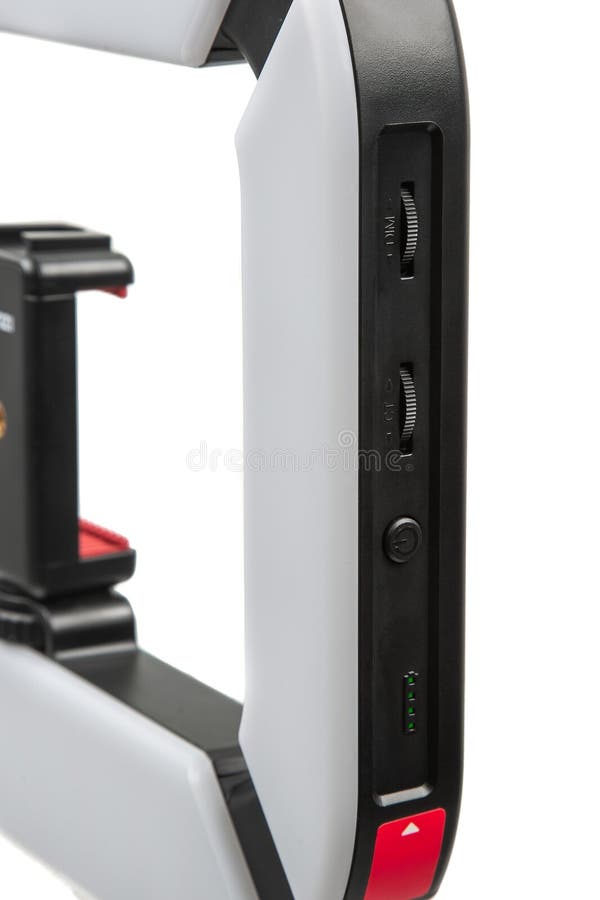
Free with trial LED Ring Light Side Controls. Close-up of the side controls of a white rectangular LED ring light, showing buttons, dials, and indicator lights. Interface function illustrations LED Ring Light Side Controls. Close-up of the side controls of a white rectangular LED ring light, showing buttons, dials, and indicator lights
 Sign in