Free with trial Glossy web buttons. Beautiful colorful and fresh glossy web buttons, also available in vector format. Select sample vectors Glossy web buttons. Beautiful colorful and fresh glossy web buttons, also available in vector format
Free with trial Web buttons on black. Beautiful colorful and fresh glossy web buttons on black background. Select sample vectors Web buttons on black. Beautiful colorful and fresh glossy web buttons on black background
Free with trial Gray web buttons long. Vector gray buttons for computing and web. Select sample vectors Gray web buttons long. Vector gray buttons for computing and web
Free with trial Put your own content in shopping cart with only 5 step in e. q. Photoshop or Gimp. Content of image are 3 member. Back cover, front cover and black contour of front cover. This is the procedure: 1. Image/Extract black contour of front cover in separate layer 2. Select/Color Range/Shadows of selection (this make selection of front cover contour) 3. Select/Save selection of black contour 4. Put front cover over black contour in separate layer and get Select/Load selection 5. Select/Inverse and delete all white fields around front cover So you have now 2 layers (Front and back cover) and between them you can put your own isolated content (View sample on image). Select sample illustrations Your content in a cart. Put your own content in shopping cart with only 5 step in e.q. Photoshop or Gimp. Content of image are 3 member. Back cover, front cover. Put your own content in shopping cart with only 5 step in e.q. Photoshop or Gimp. Content of image are 3 member. Back cover, front cover and black contour of front cover. This is the procedure: 1. Image/Extract black contour of front cover in separate layer 2. Select/Color Range/Shadows of selection (this make selection of front cover contour) 3. Select/Save selection of black contour 4. Put front cover over black contour in separate layer and get Select/Load selection 5. Select/Inverse and delete all white fields around front cover So you have now 2 layers (Front and back cover) and between them you can put your own isolated content (View sample on image)
Free with trial Web buttons. Glossy web buttons. Different colors. Select sample vectors Web buttons. Glossy web buttons. Different colors
Free with trial Web buttons. Round web buttons with different shiny colors. Select sample vectors Web buttons. Round web buttons with different shiny colors
Free with trial Web buttons. Glossy web buttons. Different colors. Select sample vectors Web buttons. Glossy web buttons. Different colors
Free with trial Long metallic gray. Vector buttons with metallic frame, gray collection. Select sample vectors Long metallic gray. Vector buttons with metallic frame, gray collection
Free with trial Modern web buttons kit. Modern web buttons collection. glossy and rounded kit. ready to be integrated in to your design. vector file included. Select sample vectors Modern web buttons kit. Modern web buttons collection. glossy and rounded kit. ready to be integrated in to your design. vector file included
Free with trial Web buttons. Round 3D button set for web page. Select sample vectors Web buttons. Round 3D button set for web page
Free with trial Marketing plan. Green target hitted by a green dart with many other grey targets around. Select sample illustrations Marketing plan. Green target hitted by a green dart with many other grey targets around
Free with trial Website navigation templates and buttons. Select sample vectors Website elements. Website navigation templates and buttons. Website navigation templates and buttons...
Free with trial Vector long glossy buttons for computer, web etc. Select sample vectors Glossysquarebuttons. Vector long glossy buttons for computer, web etc. Vector long glossy buttons for computer, web etc.
Free with trial Blue web buttons long. Vector buttons for web and computing. Select sample vectors Blue web buttons long. Vector buttons for web and computing
Free with trial Vector Red Glass Button. Select sample illustrations Vector Red Glass Button. Vector Deep Red Glass Button
Free with trial Vector Green Glass Button. Select sample illustrations Vector Green Glass Button. Vector Deep Green Glass Button
Free with trial Vector set of glossy web icons. To see similar, please visit my gallery. Select sample vectors Vector set of glossy web icons. To see similar, please visit my gallery
Free with trial Sample. Taking a representative random sample from a larger group. Select sample illustrations Sample. Taking a representative random sample from a larger group
Free with trial Set of Colorful Vector Sample stickers. For various options - vertical. Select sample vectors Set of Colorful Vector Sample stickers. For various options - vertical
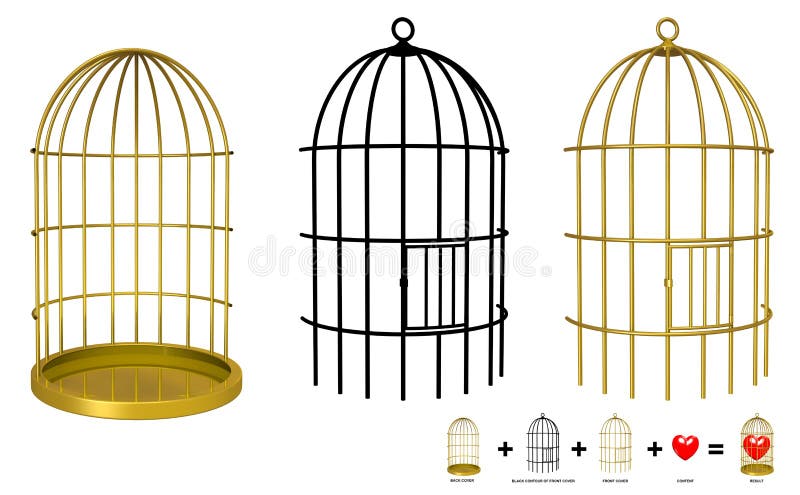
Free with trial Put your object in the cage with only 4 step in e. q. Photoshop or Gimp. Content of image contain 3 member. Back cover, front cover and black contour of front cover. This is the procedure: 1. Image/Extract black contour of front cover in separate layer 2. Make selection of of black contour with magic wand tool and save selection 3. Put front cover over black contour in separate layer and get Select/Load selection 4. Select/Inverse and delete all white fields around front cover So you have now 2 layers (Front and back cover) and between them you can put your isolated object (View sample on image). Select sample illustrations Your object in the cage. Put your object in the cage with only 4 step in e.q. Photoshop or Gimp. Content of image contain 3 member. Back cover, front cover and. Put your object in the cage with only 4 step in e.q. Photoshop or Gimp. Content of image contain 3 member. Back cover, front cover and black contour of front cover. This is the procedure: 1. Image/Extract black contour of front cover in separate layer 2. Make selection of of black contour with magic wand tool and save selection 3. Put front cover over black contour in separate layer and get Select/Load selection 4. Select/Inverse and delete all white fields around front cover So you have now 2 layers (Front and back cover) and between them you can put your isolated object (View sample on image)
Free with trial Set of Colorful Vector Sample option stickers. Set of Colorful Vector Sample stickers for various options. Select sample vectors Set of Colorful Vector Sample option stickers. Set of Colorful Vector Sample stickers for various options
Free with trial Set of Colorful Vector Sample option stickers. Set of Colorful Vector Sample stickers for various options. Select sample vectors Set of Colorful Vector Sample option stickers. Set of Colorful Vector Sample stickers for various options
Free with trial Set of Colorful Vector Sample option boxes. Set of Colorful Vector Sample stickers for various options. Select sample vectors Set of Colorful Vector Sample option boxes. Set of Colorful Vector Sample stickers for various options
Free with trial Vector Grey Glass Button. Vector Grey Reflecting Glass Button. Select sample illustrations Vector Grey Glass Button. Vector Grey Reflecting Glass Button
Free with trial 3D buttons in primary colors. Select sample vectors 3D Buttons. In primary colors. 3D buttons in primary colors
Free with trial Longweblue. Vector blue buttons for web and computing. Select sample vectors Longweblue. Vector blue buttons for web and computing
Free with trial Different colors of web buttons. Glossy web buttons. Select sample vectors Web buttons. Different colors of web buttons. Glossy web buttons. Different colors of web buttons. Glossy web buttons.
Free with trial Two glossy web buttons. Vector file available. Select sample vectors Glossy buttons. Two glossy web buttons. Vector file available. Two glossy web buttons. Vector file available.
Free with trial Golden frame hot. Buttons in hot colors with golden frame. Select sample vectors Golden frame hot. Buttons in hot colors with golden frame
Free with trial Website navigation templates and buttons. Select sample vectors Website elements. Website navigation templates and buttons. Website navigation templates and buttons...
Free with trial Vector long buttons in five colors for internet, computing etc. Select sample vectors Multilongbuttons. Vector long buttons in five colors for internet, computing etc. Vector long buttons in five colors for internet, computing etc.
Free with trial Website navigation templates and buttons. Select sample vectors Website elements. Website navigation templates and buttons. Website navigation templates and buttons...
Free with trial Long metallic hot. Vector buttons with metallic frame, hot collection. Select sample vectors Long metallic hot. Vector buttons with metallic frame, hot collection
Free with trial Clover web buttons. Clover round web buttons with different shiny green colors. Select sample vectors Clover web buttons. Clover round web buttons with different shiny green colors
Free with trial Glossy web buttons. Different colors of web buttons. Select sample vectors Glossy web buttons. Different colors of web buttons
Free with trial Metallic frame hot. Illustration of buttons in hot colors. Select sample vectors Metallic frame hot. Illustration of buttons in hot colors
Free with trial Glossy web buttons. Tech glossy web buttons with different colors. Select sample vectors Glossy web buttons. Tech glossy web buttons with different colors
Free with trial Long metallic violet. Vector buttons with metallic frame, purple collection. Select sample vectors Long metallic violet. Vector buttons with metallic frame, purple collection
Free with trial 3D Button Solid White. 3D button in solid white, front and side angle. Select sample illustrations 3D Button Solid White. 3D button in solid white, front and side angle
Free with trial High details illustration of website buttons and badge. Select sample vectors Glossy website buttons. High details illustration of website buttons and badge. High details illustration of website buttons and badge.
Free with trial Perfect shiny buttons for your website. Select sample vectors Glossy website buttons. Perfect shiny buttons for your website. Perfect shiny buttons for your website.
Free with trial Green targets and arrow. Green arrow hitting the center of a green target there is grey targets around. Select sample illustrations Green targets and arrow. Green arrow hitting the center of a green target there is grey targets around
Free with trial Vector Blue Glass Button. Vector Light Blue Glass Button. Select sample illustrations Vector Blue Glass Button. Vector Light Blue Glass Button
Free with trial Web buttons. Round web buttons with different shiny colors. Select sample vectors Web buttons. Round web buttons with different shiny colors
Free with trial Web buttons. Round web buttons with different shiny colors. Select sample vectors Web buttons. Round web buttons with different shiny colors
Free with trial Vector set of empty web icons. To see similar, please visit my gallery. Select sample vectors Vector set of empty web icons. To see similar, please visit my gallery
Free with trial High details vector illustration of website buttons. Select sample vectors Easy Editable Website Buttons-Vector. High details vector illustration of website buttons. High details vector illustration of website buttons.
Free with trial Alphabet icon. Illustration of alphabet icon on white background. Select sample illustrations Alphabet icon. Illustration of alphabet icon on white background
Free with trial Web buttons. Round web buttons with different shiny colors. Select sample vectors Web buttons. Round web buttons with different shiny colors
Free with trial Set of Vector paper cards with origami corner. Set of Vector paper cards (template) with origami corner. Select sample vectors Set of Vector paper cards with origami corner. Set of Vector paper cards (template) with origami corner
Free with trial High details vector illustration of navigation buttons. Additional vector format Eps8 (you can very easy edit with separate layers). Select sample vectors Easy Editable Website Navigation Templates-Vector. High details vector illustration of navigation buttons. Additional vector format Eps8 (you can very easy edit. High details vector illustration of navigation buttons. Additional vector format Eps8 (you can very easy edit with separate layers)
Free with trial Digital display background. All picture are coming from my gallery background. Select sample illustrations Digital display background. All picture are coming from my gallery background
Free with trial This glossy round glass buttons set offers professional web design vector illustration featuring shiny button icons with perfect circle elements for modern interface projects. Each icon displays vibrant color variations including blue red green yellow orange purple white black gray grey aqua magenta pink crimson bronze gold golden silver violet with multicolor rainbow neon effects creating bright vibrant vivid colored colors colorful appearances. Every shape features distinctive ball sphere geometry with stunning gradient reflection shadow effects including oval rectangle rectangles formats using geometric shapes with gloss glowing shine transparent metallic crystal glassy finishes. Premium plastic metal gel liquid steel material construction supports interactive click clicking push touch tap toggle select choose navigate browse press pushing functionality. Features include blank internet empty graphic symbol background isolated navigation sign template art clean element menu site badge business computer image light style website balls banner candy clipart collection download editable online orb realistic sale sparse variation www abstract advertising badges bulb caramel choice concept decoration digital effect emblem label layout logo with additional mac mobile mockup multimedia new object objects outline paint pictogram pin player presentation retail rounded sample simple simplicity spheres technology tool webabstract webpage advertisement app application apply apps backdrop backgrounds banners bar bauble blend border brightly browser bubble bubbles buy card check clear clip colour commerce components control creative curve cyberspace decor decorative detailed development different display dot dreamstime ecommerce edges elegant eps10 exclusive eye eyecandy finger form forms frame front futuristic game games glamour globe glow gradients group gui highlight horizontal illuminated interactive keypad kit knob latest link lit login luxury matted minimal minimalist mock multi music nav option options orbit pack page panel pause pearl pills pins place play polish premium price primary reflect retro rings rollover screen seals search send shade shadows shop shopping side social soft space spectrum speech start sticker stickers submit switch tag text thought trendy turn upload user ux video warning webbuttons webdesign websites capabilities. Select sample vectors Web buttons button glass icon circle glossy blue design set shiny vector round color icons red blank bright plastic shape green. This glossy round glass buttons. This glossy round glass buttons set offers professional web design vector illustration featuring shiny button icons with perfect circle elements for modern interface projects. Each icon displays vibrant color variations including blue red green yellow orange purple white black gray grey aqua magenta pink crimson bronze gold golden silver violet with multicolor rainbow neon effects creating bright vibrant vivid colored colors colorful appearances. Every shape features distinctive ball sphere geometry with stunning gradient reflection shadow effects including oval rectangle rectangles formats using geometric shapes with gloss glowing shine transparent metallic crystal glassy finishes. Premium plastic metal gel liquid steel material construction supports interactive click clicking push touch tap toggle select choose navigate browse press pushing functionality. Features include blank internet empty graphic symbol background isolated navigation sign template art clean element menu site badge business computer image light style website balls banner candy clipart collection download editable online orb realistic sale sparse variation www abstract advertising badges bulb caramel choice concept decoration digital effect emblem label layout logo with additional mac mobile mockup multimedia new object objects outline paint pictogram pin player presentation retail rounded sample simple simplicity spheres technology tool webabstract webpage advertisement app application apply apps backdrop backgrounds banners bar bauble blend border brightly browser bubble bubbles buy card check clear clip colour commerce components control creative curve cyberspace decor decorative detailed development different display dot dreamstime ecommerce edges elegant eps10 exclusive eye eyecandy finger form forms frame front futuristic game games glamour globe glow gradients group gui highlight horizontal illuminated interactive keypad kit knob latest link lit login luxury matted minimal minimalist mock multi music nav option options orbit pack page panel pause pearl pills pins place play polish premium price primary reflect retro rings rollover screen seals search send shade shadows shop shopping side social soft space spectrum speech start sticker stickers submit switch tag text thought trendy turn upload user ux video warning webbuttons webdesign websites capabilities.
Free with trial Web buttons. Glossy web buttons on white background. Select sample illustrations Web buttons. Glossy web buttons on white background
Free with trial Color wheel guide with saturation and highlight. Colour picker assistant. Select sample vectors Color wheel guide with saturation and highlight. Colour picker assistant.
Free with trial Set of Blue Vector Sample option paper origami. Select sample vectors Set of Blue Vector Sample option paper origami. Set of Blue Vector Sample option folding paper origami
Free with trial Set of Colorful Vector Sample option stickers. Set of Colorful Vector Sample stickers for various options. Select sample vectors Set of Colorful Vector Sample option stickers. Set of Colorful Vector Sample stickers for various options
Free with trial Set of Colorful Vector Sample option cards. Set of Colorful Vector Sample cards for various options. Select sample vectors Set of Colorful Vector Sample option cards. Set of Colorful Vector Sample cards for various options
Free with trial Set of Colorful Vector Sample option stickers. Set of Colorful Vector Sample stickers for various options. Select sample vectors Set of Colorful Vector Sample option stickers. Set of Colorful Vector Sample stickers for various options
Free with trial Set of Colorful Vector Sample option cards. Set of Colorful Vector Sample cards for various options. Select sample vectors Set of Colorful Vector Sample option cards. Set of Colorful Vector Sample cards for various options
Free with trial Vector long buttons in five colors for computer, web etc. Select sample vectors 3D buttons. Vector long buttons in five colors for computer, web etc. Vector long buttons in five colors for computer, web etc.
Free with trial Frame btn. Frame button easy to resize or change color. Select sample vectors Frame btn. Frame button easy to resize or change color
Free with trial Web buttons. Round web buttons with different shiny colors. Select sample vectors Web buttons. Round web buttons with different shiny colors
Free with trial Frame btn. Frame button easy to resize or change color. Select sample vectors Frame btn. Frame button easy to resize or change color
Free with trial Web buttons. Round web buttons with different shiny colors. Select sample vectors Web buttons. Round web buttons with different shiny colors
Free with trial Web buttons. Round web buttons with different shiny colors. Select sample vectors Web buttons. Round web buttons with different shiny colors
Free with trial Web buttons. Round web buttons with different shiny colors. Select sample vectors Web buttons. Round web buttons with different shiny colors
Free with trial Golden frame purple. Violet long buttons with golden frame. Select sample vectors Golden frame purple. Violet long buttons with golden frame
Free with trial Red web buttons long. Vector yellow and red web buttons. Select sample vectors Red web buttons long. Vector yellow and red web buttons
Free with trial Summer funky t-shirts. Summer Graphic t-shirts. To see similar, please visit my gallery. Select sample vectors Summer funky t-shirts. Summer Graphic t-shirts. To see similar, please visit my gallery
Free with trial Set of metallic colored buttons for webdesign. Isolated on black. Select sample illustrations Set of metallic colored web buttons. Set of metallic colored buttons for webdesign. Isolated on black. Set of metallic colored buttons for webdesign. Isolated on black.
Free with trial Web buttons. Round web buttons with different shiny colors. Select sample vectors Web buttons. Round web buttons with different shiny colors
Free with trial Web buttons. Round web buttons with different shiny colors. Select sample vectors Web buttons. Round web buttons with different shiny colors
Free with trial Web buttons. Rectangular web buttons with different shiny colors. Select sample vectors Web buttons. Rectangular web buttons with different shiny colors
Free with trial Web buttons. Round web buttons with different shiny colors. Select sample vectors Web buttons. Round web buttons with different shiny colors
Free with trial Vector Product versions comparison cards - with description. Select sample vectors Vector Product versions comparison cards. With description
Free with trial Blue download. Set of the blue download buttons. Select sample vectors Blue download. Set of the blue download buttons
Free with trial Vector set of fire glossy web icons. To see similar, please visit my gallery. Select sample vectors Vector set of fire glossy web. Icons. To see similar, please visit my gallery
Free with trial Golden frame blue. Buttons in blue colors with golden frame. Select sample vectors Golden frame blue. Buttons in blue colors with golden frame
Free with trial Web buttons. Round web buttons with different shiny colors. Select sample vectors Web buttons. Round web buttons with different shiny colors
 Sign in