Free with trial Metabolism booting foods, info graphic food, vegetable, fruit. Vector. Booting vectors Metabolism booting foods, info graphic food, vegetable, fruit. Vector
Free with trial Wheat growing stages, life cycle of wheat plant infographic elements in flat design, botanical set of illustrations isolated on white background. Wheat grain, seedling, stem, tillering, jointing,. Booting vectors Wheat growing stages, life cycle of wheat plant infographic elements in flat design, botanical set of illustrations. Isolated on white background. Wheat grain. Wheat growing stages, life cycle of wheat plant infographic elements in flat design, botanical set of illustrations isolated on white background. Wheat grain, seedling, stem, tillering, jointing,
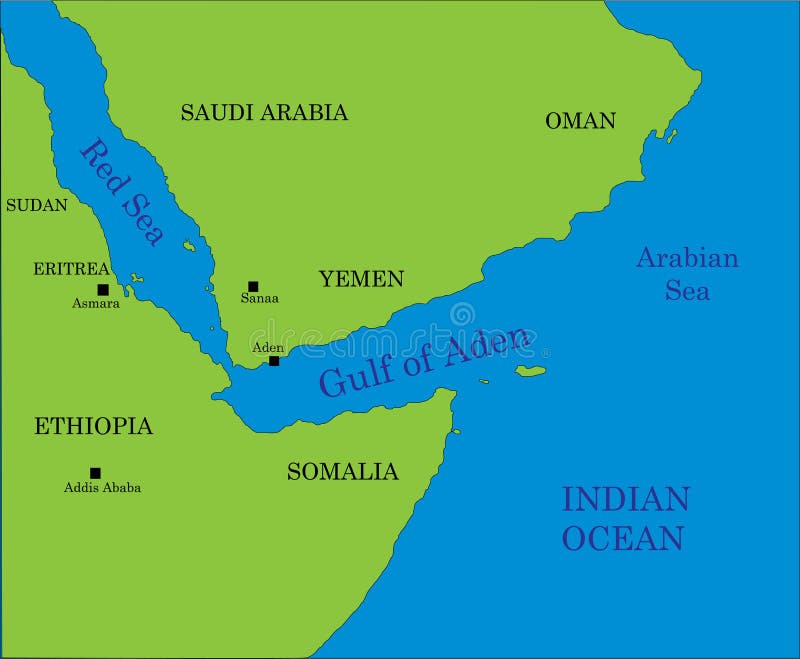
Free with trial Gulf of Aden map. Map of the gulf of Aden area, beetwen Africa and Arabia with indication of the main geographical landmarks. Booting vectors Gulf of Aden map. Map of the gulf of Aden area, beetwen Africa and Arabia with indication of the main geographical landmarks
Free with trial Detailed botanical vector illustration of wheat growth stages for agricultural use including irrigation and fertilizer planning. Suitable for agribusiness and crop production professionals. Booting vectors Wheat Growth Stages Accurate Botanical Vector. Detailed botanical vector illustration of wheat growth stages for agricultural use including irrigation and. Detailed botanical vector illustration of wheat growth stages for agricultural use including irrigation and fertilizer planning. Suitable for agribusiness and crop production professionals.
Free with trial Loading bar. Progress bar. Loading sign. Black background. Vector illustration. Vector. Booting vectors Loading bar. Progress bar. Loading sign. Black background. Vector illustration. Loading bar. Progress bar. Loading sign. Black background. Vector
Free with trial Realistic laptop vector illustration in black and green color. Green and black color laptop vector illustration. Booting vectors Realistic laptop vector illustration in black and green color. Green and black color laptop vector illustration
Free with trial Realistic laptop vector illustration in pink and purple color. Pink and purple laptop vector illustration. Booting vectors Realistic laptop vector illustration in pink and purple color. Pink and purple laptop vector illustration
Free with trial Realistic laptop vector illustration in black and red color. Red color laptop vector illustration. Booting vectors Realistic laptop vector illustration in black and red color. Red color laptop vector illustration
Free with trial Realistic laptop vector illustration display deer wild life video. Video and music media player laptop vector illustration in deer wild life background. Booting vectors Realistic laptop vector illustration display deer wild life video. Video and music media player laptop vector illustration in deer wild life background
Free with trial Pixelated progress bar showing loading of 2022 year. Vector. Booting vectors Pixelated progress bar showing loading of 2022 year. Vector. Pixelated progress bar showing loading of 2022 year
Free with trial Three computer monitor icons are displayed. Each monitor shows a booting or reboot progress bar in the center. The first icon is in black and white with a clear outline. The second has a thicker black outline with a filled dark background. The third displays a colored screen with a yellow and orange gradient progress bar, set against a light blue background and a gray outline. Each design features a simple, minimalistic style, illustrating different graphic representations of a loading process. Booting vectors Multipurpose booting vector icon in outline, glyph, filled outline style. Black outline, solid glyph, outline color. Three computer monitor icons are displayed. Three computer monitor icons are displayed. Each monitor shows a booting or reboot progress bar in the center. The first icon is in black and white with a clear outline. The second has a thicker black outline with a filled dark background. The third displays a colored screen with a yellow and orange gradient progress bar, set against a light blue background and a gray outline. Each design features a simple, minimalistic style, illustrating different graphic representations of a loading process.
Free with trial Startup booting planning yellow vertical infographic 4 steps. Integrating technology in business processes. Commercial activity. Editable thin line icons diagram process. Lexend font used. Booting vectors Startup booting planning yellow vertical infographic 4 steps. Integrating technology in business processes. Commercial activity. Editable thin line icons
Free with trial A dynamic visualization of progress and innovation. Concentric green circles segment and build, symbolizing data processing, sustainable growth, or a system booting up. Booting vectors Futuristic Green Circular Data Graphic. A dynamic visualization of progress and innovation. Concentric green circles segment and build, symbolizing data. A dynamic visualization of progress and innovation. Concentric green circles segment and build, symbolizing data processing, sustainable growth, or a system booting up
Free with trial A delightful vector illustration of a START GAME screen, featuring a classic retro video game controller. This image evokes the excitement of booting up a vintage console, perfect for gaming events, merchandise, or digital content celebrating the golden age of video games, vector design Generative AI. Booting vectors START GAME Retro Console Screen Vector Illustration, vector design Generative AI. A delightful vector illustration of a START GAME screen, featuring a classic. A delightful vector illustration of a START GAME screen, featuring a classic retro video game controller. This image evokes the excitement of booting up a vintage console, perfect for gaming events, merchandise, or digital content celebrating the golden age of video games, vector design Generative AI
Free with trial Cloud storage outline concept. Booting or using cloud servers, remote access computers. Business processes. Flat isometric vector illustration isolated on white background. Booting vectors Cloud storage outline concept. Booting or using cloud servers, remote access computers. Business processes. Flat. Isometric vector illustration isolated on
Free with trial Modern blue technology background with a central glowing power button, symbolizing digital startup, system activation, and futuristic control interfaces in a smart network environment. Booting vectors Power Button Interface â€\' Futuristic Tech Startup System Background. Modern blue technology background with a central glowing power button, symbolizing. Modern blue technology background with a central glowing power button, symbolizing digital startup, system activation, and futuristic control interfaces in a smart network environment
Free with trial Botanically accurate vector of oat growth stages for use in farming, fertilizer application, and irrigation timing. Suitable for agronomy, crop monitoring, and agrochemical planning. Booting vectors Oat Growth Stages Vector Illustration with Accurate Botanical Detail for Agricultural Use and Crop Development Planning. Botanically accurate vector of oat. Botanically accurate vector of oat growth stages for use in farming, fertilizer application, and irrigation timing. Suitable for agronomy, crop monitoring, and agrochemical planning.
Free with trial Developer headset icon with monitor display and power flame symbol for software. System access and support. Booting vectors Developer headset icon with monitor display and power flame symbol for software. System access and support
Free with trial Black smartphone with blank screen and white progress bar loading on dark background. Modern mobile device displaying empty loading progress bar. Booting vectors Black smartphone with blank screen and white progress bar loading on dark background. Modern mobile device displaying empty loading progress bar
Free with trial Operating systems and software platforms manage computer resources, support application execution, organize digital operations, and provide essential interfaces for users. Booting vectors Operating Systems and Software Platforms for Computer Management Application Compatibility and Digital Productivity. Operating systems and software platforms. Operating systems and software platforms manage computer resources, support application execution, organize digital operations, and provide essential interfaces for users
Free with trial Cyan initializing progress bar vector set featuring solid outlines and diagonal striped indicators for system startup, software interfaces, futuristic dashboards, and digital technology. Booting vectors Cyan initializing progress bar vector set featuring solid outlines and diagonal striped indicators for system startup, software. Interfaces, futuristic. Cyan initializing progress bar vector set featuring solid outlines and diagonal striped indicators for system startup, software interfaces, futuristic dashboards, and digital technology
Free with trial Cyan initializing progress bar vector set featuring diagonal striped fills and outlined horizontal indicators for system startup screens, software interfaces, and futuristic dashboards. Booting vectors Cyan initializing progress bar vector set featuring diagonal striped fills and outlined horizontal indicators for system startup. Screens, software interfaces. Cyan initializing progress bar vector set featuring diagonal striped fills and outlined horizontal indicators for system startup screens, software interfaces, and futuristic dashboards
Free with trial This outline icon displays a security shield containing a padlock, adjacent to a microchip or CPU representing hardware protection Rendered by Ai. The illustration clearly conveys concepts of data encryption and cyber defense for technology systems, beautifully Rendered by Ai. Booting vectors Digital Security Chip and Shield Outline Icon. This outline icon displays a security shield containing a padlock, adjacent to a microchip or CPU representing. This outline icon displays a security shield containing a padlock, adjacent to a microchip or CPU representing hardware protection Rendered by Ai. The illustration clearly conveys concepts of data encryption and cyber defense for technology systems, beautifully Rendered by Ai
Free with trial Application initialization icon in line design. Application, initialization, startup, software, launch, loading, program on white background vector. Application initialization editable stroke icon. Booting vectors Application initialization icon in line design. Application, initialization, startup, software, launch, loading, program. On white background vector. Application initialization icon in line design. Application, initialization, startup, software, launch, loading, program on white background vector. Application initialization editable stroke icon
Free with trial Playful raccoon joyfully booting a bright ball. Booting vectors Cute Raccoon Kicking Ball. Playful raccoon joyfully booting a bright ball. Playful raccoon joyfully booting a bright ball.
Free with trial Simple Fun Resetting Brain Lines Logo Design. Brain Symbol With Reset Icon In The Middle Logo Design. Booting vectors Simple Fun Resetting Brain Lines Logo Design. Brain Symbol With Reset Icon In The Middle Logo Design
Free with trial Three progress bars are displayed horizontally. The first is outlined in black with a white interior, featuring a segment on the right. The middle bar is solid black with a white vertical separator. The third bar has a dark gray outline and a light blue interior with a right segment. Each bar shows varying stages of progress, representing different styles of graphic design elements often used in user interfaces. Booting vectors Multipurpose loading vector icon in outline, glyph, filled outline style. Three icon style variants in one pack. Three progress bars are displayed horizontally. Three progress bars are displayed horizontally. The first is outlined in black with a white interior, featuring a segment on the right. The middle bar is solid black with a white vertical separator. The third bar has a dark gray outline and a light blue interior with a right segment. Each bar shows varying stages of progress, representing different styles of graphic design elements often used in user interfaces.
Free with trial A clean, minimal vector-style icon shows a circular ring with a central white oval cutout, resembling a power or standby symbol. The design uses dark gray and black tones with a diagonal shadow-like wedge and a small star accent near the lower left. The background is plain white, making the icon suitable for UI, app branding, technology themes, and instructional graphics. Its simple geometry works well for concepts like activation, status, control, and connectivity. Booting vectors Abstract power button icon with star. A clean, minimal vector-style icon shows a circular ring with a central white oval cutout, resembling a power or standby. A clean, minimal vector-style icon shows a circular ring with a central white oval cutout, resembling a power or standby symbol. The design uses dark gray and black tones with a diagonal shadow-like wedge and a small star accent near the lower left. The background is plain white, making the icon suitable for UI, app branding, technology themes, and instructional graphics. Its simple geometry works well for concepts like activation, status, control, and connectivity.
Free with trial Tired laptop with droopy eyes and zzz symbols, needs coffee to function. Funny concept about computer loading slowly, work exhaustion. Booting vectors Sleepy laptop needing caffeine to load, funny computer with tired eyes and coffee cup. Tired laptop with droopy eyes and zzz symbols, needs coffee to function. Tired laptop with droopy eyes and zzz symbols, needs coffee to function. Funny concept about computer loading slowly, work exhaustion
Free with trial A cheerful cartoon goalkeeper in gloves kicks a soccer ball into the air. Useful for sports clubs, coaching material and playful football designs. Booting vectors Playful cartoon goalkeeper booting a soccer ball high with a raised leg and open mouth. A cheerful cartoon goalkeeper in gloves kicks a soccer ball into the air. A cheerful cartoon goalkeeper in gloves kicks a soccer ball into the air. Useful for sports clubs, coaching material and playful football designs.
Free with trial Set of Power ON OFF Button Icons. Turn Off. Turn On. Shutdown. Booting. Vector. Booting vectors Set of Power ON OFF Button Icons. Turn Off. Turn On. Shutdown. Booting. Vector.
Free with trial Thin line laptop booting. Thin line computer icon done in vector. Booting vectors Thin line laptop booting. Thin line computer icon done in vector
Free with trial Cogwheel gear mechanism icon. Background of gears that symbolize system repairs, errors in loading pages, failed booting, uncompleted processes. Booting vectors Cogwheel gear mechanism icon. Cogwheel gear mechanism icon. Background of gears that symbolize system repairs. Errors in loading pages, failed booting. Cogwheel gear mechanism icon. Cogwheel gear mechanism icon. Background of gears that symbolize system repairs, errors in loading pages, failed booting, uncompleted processes.
Free with trial Countdown 2023. Year of rabbit. Progress of booting New year. Vector illustration isolated on white background. Booting vectors Countdown 2023. Year of rabbit. Progress of booting New year. Vector illustration isolated on white background.
Free with trial Loading bar. Progress bar. Loading sign. Black background. Vector illustration. Vector. Booting vectors Loading bar. Progress bar. Loading sign. Black background. Vector illustration. Loading bar. Progress bar. Loading sign. Black background. Vector
Free with trial White retro loading 8 bit on black background. Now load bar. Minimalistic pixel art. Vector. Booting vectors White retro loading 8 bit on black background. Now load bar. Minimalistic pixel art. Vector. White retro loading 8 bit on black background. Now load bar
Free with trial Realistic laptop vector illustration in gray color. Black and gray laptop vector illustration. Booting vectors Realistic laptop vector illustration in gray color. Black and gray laptop vector illustration
Free with trial Realistic laptop vector illustration in black and pink color. Pink color laptop vector illustration for girl. Booting vectors Realistic laptop vector illustration in black and pink color. Pink color laptop vector illustration for girl
Free with trial Realistic laptop vector illustration in black and purple color. Black and purple color laptop vector illustration. Booting vectors Realistic laptop vector illustration in black and purple color. Black and purple color laptop vector illustration
Free with trial Realistic laptop vector illustration in black and orange color. Orange color laptop vector illustration. Booting vectors Realistic laptop vector illustration in black and orange color. Orange color laptop vector illustration
Free with trial BIOS servise icon,cartoon style. BIOS servise icon in cartoon style on a white background. Booting vectors BIOS servise icon,cartoon style. BIOS servise icon in cartoon style on a white background
Free with trial Realistic laptop vector illustration in yellow and green color. Yellow and green color laptop vector illustration. Booting vectors Realistic laptop vector illustration in yellow and green color. Yellow and green color laptop vector illustration
Free with trial Realistic laptop vector illustration in black color. Black color laptop vector illustration. Booting vectors Realistic laptop vector illustration in black color. Black color laptop vector illustration
Free with trial Realistic laptop vector illustration in black and navy blue color. Navy blue color laptop vector illustration. Booting vectors Realistic laptop vector illustration in black and navy blue color. Navy blue color laptop vector illustration
Free with trial Box with a soft disc icon, cartoon style. Box with a soft disc icon in cartoon style on a white background. Booting vectors Box with a soft disc icon, cartoon style. Box with a soft disc icon in cartoon style on a white background
Free with trial Realistic laptop vector illustration in black and blue color. Blue color laptop vector illustration. Booting vectors Realistic laptop vector illustration in black and blue color. Blue color laptop vector illustration
Free with trial Realistic laptop vector illustration display music media player. Video and music media player laptop vector illustration. Booting vectors Realistic laptop vector illustration display music media player. Video and music media player laptop vector illustration
Free with trial Realistic laptop vector illustration display music media player. Video and music media player laptop vector illustration. Booting vectors Realistic laptop vector illustration display music media player. Video and music media player laptop vector illustration
Free with trial Realistic laptop vector illustration display music media player. Video and music media player laptop vector illustration. Booting vectors Realistic laptop vector illustration display music media player. Video and music media player laptop vector illustration
Free with trial Computer line icons signs set. Design collection of Hardware, Software, Data, Network, Monitor, Keyboard, Mouse, Processor outline vector concept illustrations. Booting vectors Computer line icons signs set. Design collection of Hardware, Software, Data, Network, Monitor, Keyboard, Mouse. Processor outline vector concept illustrations
Free with trial Computer line icons signs set. Design collection of Hardware, Software, Data, Network, Monitor, Keyboard, Mouse, Processor outline vector concept illustrations. Booting vectors Computer line icons signs set. Design collection of Hardware, Software, Data, Network, Monitor, Keyboard, Mouse. Processor outline vector concept illustrations
Free with trial Computer line icons signs set. Design collection of Hardware, Software, Data, Network, Monitor, Keyboard, Mouse, Processor outline vector concept illustrations. Booting vectors Computer line icons signs set. Design collection of Hardware, Software, Data, Network, Monitor, Keyboard, Mouse. Processor outline vector concept illustrations
Free with trial Computer line icons signs set. Design collection of Hardware, Software, Data, Network, Monitor, Keyboard, Mouse, Processor outline vector concept illustrations. Booting vectors Computer line icons signs set. Design collection of Hardware, Software, Data, Network, Monitor, Keyboard, Mouse. Processor outline vector concept illustrations
Free with trial Computer line icons signs set. Design collection of Hardware, Software, Data, Network, Monitor, Keyboard, Mouse, Processor outline vector concept illustrations. Booting vectors Computer line icons signs set. Design collection of Hardware, Software, Data, Network, Monitor, Keyboard, Mouse. Processor outline vector concept illustrations
Free with trial Progress bar showing loading of 2020 Web. Booting vectors Progress bar showing loading of 2020 Web. Progress bar showing loading of 2020
Free with trial Progress bar showing loading of 2020. For web. Booting vectors Progress bar showing loading of 2020. For web
Free with trial Set progress bar showing loading of 2022 vector. From 2021 to 2022 year. Vector. Booting vectors Set progress bar showing loading of 2022 vector. From 2021 to 2022 year. Vector. Set progress bar showing loading of 2022 vector. From 2021 to 2022 year
Free with trial Set progress bar showing loading of 2021. Vector illustration. Booting vectors Set progress bar showing loading of 2021. Vector illustration. Set progress bar showing loading of 2021
Free with trial 2020 New Year is Loading with progress bar. Vector Illustration. Booting vectors 2020 New Year is Loading with progress bar. Vector Illustration.
Free with trial Progress bar showing loading of 2022 vector. From 2021 to 2022 year. Booting vectors Progress bar showing loading of 2022 vector. From 2021 to 2022 year
Free with trial Set pixelated progress bar showing loading of 2021 vector. Booting vectors Set pixelated progress bar showing loading of 2021 vector. Set pixelated progress bar showing loading of 2021
Free with trial Set pixelated progress bar showing loading of 2021 vector. Booting vectors Set pixelated progress bar showing loading of 2021 vector. Set pixelated progress bar showing loading of 2021
Free with trial Set pixelated progress bar showing loading of 2022 year. Vector. Booting vectors Set pixelated progress bar showing loading of 2022 year. Vector. Set pixelated progress bar showing loading of 2022 year
Free with trial Progress bar showing loading of 2023, 2024. Booting vectors Progress bar showing loading of 2023, 2024.
Free with trial Set pixelated progress bar showing loading of 2022 year on white background. Vector. Booting vectors Set pixelated progress bar showing loading of 2022 year on white background. Vector. Set pixelated progress bar showing loading of 2022 year on white background
Free with trial Progress bar showing loading of 2022 year. Vector. Booting vectors Progress bar showing loading of 2022 year. Vector. Progress bar showing loading of 2022 year
Free with trial Progress bar showing loading of 2022 vector. From 2021 to 2022 year. Booting vectors Progress bar showing loading of 2022 vector. From 2021 to 2022 year
Free with trial Progress bar showing loading of 2020. Vector. Booting vectors Progress bar showing loading of 2020. Vector
Free with trial Pixelated progress bar showing loading of 2022 year on white background. Vector. Booting vectors Pixelated progress bar showing loading of 2022 year on white background. Vector. Pixelated progress bar showing loading of 2022 year on white background
Free with trial Progress bar showing loading of 2022 year. Vector. Booting vectors Progress bar showing loading of 2022 year. Vector. Progress bar showing loading of 2022 year
Free with trial Progress bar showing loading of 2020. Vector. Booting vectors Progress bar showing loading of 2020. Vector
Free with trial Pixelated progress bar showing loading of 2021 vector. Booting vectors Pixelated progress bar showing loading of 2021 vector. Pixelated progress bar showing loading of 2021
Free with trial Pixelated progress bar showing loading of 2021 vector. Booting vectors Pixelated progress bar showing loading of 2021 vector. Pixelated progress bar showing loading of 2021
Free with trial Progress bar showing loading of 2021 vector illustration. Progress bar showing loading of 2021. Booting vectors Progress bar showing loading of 2021 vector illustration. Progress bar showing loading of 2021
Free with trial Progress bar showing loading of 2021 vector illustration. Progress bar showing loading of 2021. Booting vectors Progress bar showing loading of 2021 vector illustration. Progress bar showing loading of 2021
Free with trial Progress bar showing loading of 2021 vector illustration. Progress bar showing loading of 2021. Booting vectors Progress bar showing loading of 2021 vector illustration. Progress bar showing loading of 2021
Free with trial Pixelated progress bar showing loading of 2022 year. Vector. Booting vectors Pixelated progress bar showing loading of 2022 year. Vector. Pixelated progress bar showing loading of 2022 year
Free with trial 2023 new year loading bar illustration. 2023 year loading bar illustration vector. Booting vectors 2023 new year loading bar illustration. 2023 year loading bar illustration vector
Free with trial Set of Happy New Year Bar Showing Loading from 2022 to 2023. Xmas Banner on Black Background. Isolated Vector Illustration. Booting vectors Set of Happy New Year Bar Showing Loading from 2022 to 2023. Xmas Banner on Black Background. Isolated Vector. Illustration
Free with trial Set of Happy New Year Bar Showing Loading from 2022 to 2023. Xmas Banner on White Background. Isolated Vector Illustration. Booting vectors Set of Happy New Year Bar Showing Loading from 2022 to 2023. Xmas Banner on White Background. Isolated Vector. Illustration
 Sign in