Free with trial Library Books in Banner - grouped easy to edit. Edit row vectors Library Books in Banner. Grouped easy to edit
Free with trial Database and Table Formatting Icons - Vector Icon Set. Edit row vectors Database and Table Formatting Icons. Vector Icon Set
Free with trial Vector illustration as silhouette of the most famous and visited landmarks and buildings in the united states of america, all located over the map of the state upon their city. Edit row vectors United states map with landmarks. Vector illustration as silhouette of the most famous and visited landmarks and buildings in the united states of america, all. Vector illustration as silhouette of the most famous and visited landmarks and buildings in the united states of america, all located over the map of the state upon their city
Free with trial Vector illustration as silhouette of the most famous and visited landmarks and buildings in the united states of america, all in a row as cool background solution with sun beams. Edit row vectors American landmarks all in a row. Vector illustration as silhouette of the most famous and visited landmarks and buildings in the united states of america, all in. Vector illustration as silhouette of the most famous and visited landmarks and buildings in the united states of america, all in a row as cool background solution with sun beams
Free with trial Vector illustration as silhouette of the most famous and visited landmarks and buildings in the united states of america, all in a row as cool background solution. Edit row vectors American landmarks background. Vector illustration as silhouette of the most famous and visited landmarks and buildings in the united states of america, all in a. Vector illustration as silhouette of the most famous and visited landmarks and buildings in the united states of america, all in a row as cool background solution
Free with trial Silhouette of people waiting in line or queue; row of chairs in background; Easy-edit layered file. Edit row vectors People Waiting in Line. Silhouette of people waiting in line or queue; row of chairs in background; Easy-edit layered file. Silhouette of people waiting in line or queue; row of chairs in background; Easy-edit layered file.
Free with trial Children. Colorful children lined up in a row. Also available in an easy to edit vector. Edit row vectors Children. Colorful children lined up in a row. Also available in an easy to edit vector
Free with trial This is a set of Price Table Templates. You can scale this image to any size without loss of resolution. Suitable for several web projects. Easy to edit. Edit row vectors Vector Price Table Templates. This is a set of Price Table Templates. You can scale this image to any size without loss of resolution. Suitable for several web. This is a set of Price Table Templates. You can scale this image to any size without loss of resolution. Suitable for several web projects. Easy to edit.
Free with trial Background with halftone effects for your design. All elements are easy to edit (in vector format, will be soon). Edit row vectors Background with text-space. Background with halftone effects for your design. All elements are easy to edit (in vector format, will be soon. Background with halftone effects for your design. All elements are easy to edit (in vector format, will be soon)
Free with trial Vector wine bottles in a row. Four wine bottles with additional format. Edit row vectors Vector wine bottles in a row. Four wine bottles with additional format
Free with trial Food and drink icons. Eps10. Image contain transparency and various blending modes. Edit row vectors Food and drink icons. Eps10 .Image contain transparency and various blending modes
Free with trial Cartoon illustration with rural landscape - the way between green rolling hills to small village. Vector file is layered EPS8, all elements are grouped and easy to edit. Edit row vectors Small Town On The River. Cartoon illustration with rural landscape - the way between green rolling hills to small village. Vector file is layered EPS8, all. Cartoon illustration with rural landscape - the way between green rolling hills to small village. Vector file is layered EPS8, all elements are grouped and easy to edit.
Free with trial All elements are easy to edit (in vector format, will be soon). Edit row vectors Grunge & hi-tech vector button. All elements are easy to edit (in vector format, will be soon. All elements are easy to edit (in vector format, will be soon)
Free with trial In vector version you can edit color and details. Edit row vectors Wave background with halftone effect. In vector version you can edit color and details. In vector version you can edit color and details.
Free with trial In vector version you can edit color and details. Edit row vectors Wave background with halftone effect. In vector version you can edit color and details. In vector version you can edit color and details.
Free with trial Cartoon Fire Flames Set and Line Light Effect for Web, Game Design. Edit row vectors Cartoon collection Fire Flames Set. Great Light Effect for Design on a white background. Isolated and easy to edit. Cartoon Fire Flames Set and Line Light Effect. Cartoon Fire Flames Set and Line Light Effect for Web, Game Design
Free with trial Family in a row vector illustration with grandparents. Edit row vectors Familyin a row illustration with grandparents. Family in a row vector illustration with grandparents. Family in a row vector illustration with grandparents.
Free with trial Boating, rafting Vector Icon which can easily edit. Edit row vectors Boating, rafting Vector Icon which can easily edit
Free with trial Human tooth. Crown and root, the tooth row is made in the vector are easy to edit. Edit row vectors Human tooth. Crown and root, the tooth row is made in the vector are easy to edit
Free with trial Boating, rafting Vector Icon which can easily editnBoating, rafting Vector Icon which can easily editn. Edit row vectors Boating, rafting Vector Icon which can easily edit. Nn. Boating, rafting Vector Icon which can easily editnBoating, rafting Vector Icon which can easily editn
Free with trial Copy cut paste save and delete icons are displayed in a row representing essential computer functions in a clean graphic style perfect for software user interfaces and application designs conveying. Edit row vectors Essential computer functions represented by copy cut paste save and delete icons in a clean and simple graphic design for software. Copy cut paste save and. Copy cut paste save and delete icons are displayed in a row representing essential computer functions in a clean graphic style perfect for software user interfaces and application designs conveying
Free with trial 3D cubes and triangles lined stripy abstract vector backgrounds set with retro style elements isolated and easy to use or edit. Templates for posters or banners, covers or ads. Edit row vectors 3D cubes and triangles lined stripy abstract vector backgrounds set with retro style elements isolated and easy to use or edit. Templates for posters or
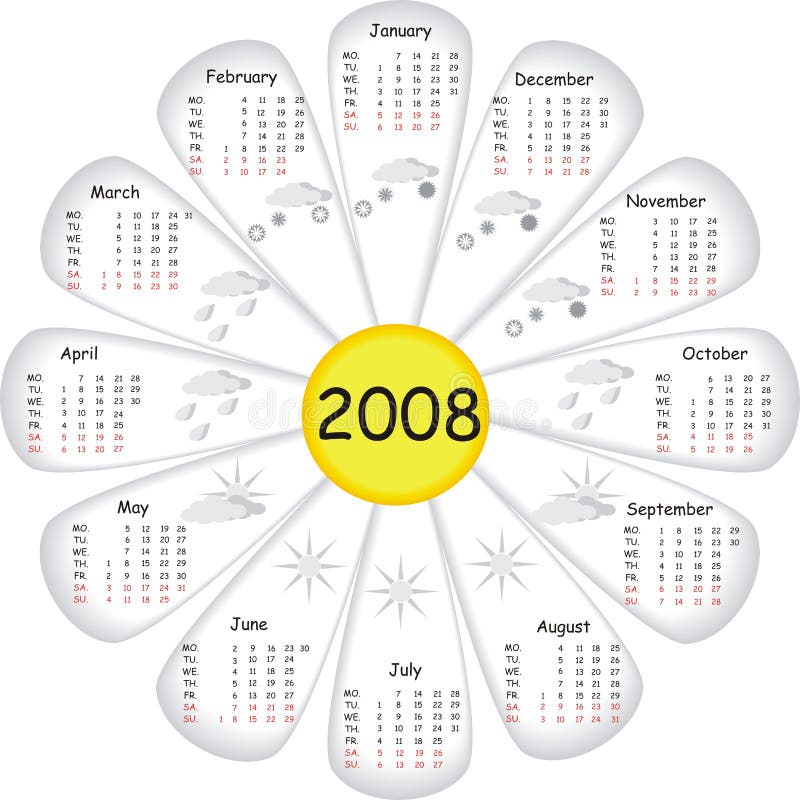
Free with trial Flower calendar. The vector image of a calendar in the form of a flower. Edit row vectors Flower calendar. The vector image of a calendar in the form of a flower
Free with trial Vector calendar. The vector image of a calendar in the form of a flower. Edit row vectors Vector calendar. The vector image of a calendar in the form of a flower
Free with trial Library Books in book case made of white timber - grouped easy to edit. Edit row vectors Library Books in book case made of white timber. Grouped easy to edit
Free with trial Background with halftone effects for your design. All elements are easy to edit (in vector format, will be soon). Edit row vectors Background with text-space. Background with halftone effects for your design. All elements are easy to edit (in vector format, will be soon. Background with halftone effects for your design. All elements are easy to edit (in vector format, will be soon)
Free with trial In vector version you can edit color and details. Edit row vectors Wave background with halftone effect. In vector version you can edit color and details. In vector version you can edit color and details.
Free with trial Flower calendar. The vector image of a calendar in the form of a flower. Edit row vectors Flower calendar. The vector image of a calendar in the form of a flower
Free with trial Background with halftone effects for your design. All elements are easy to edit (in vector format, will be soon). Edit row vectors Background with text-space. Background with halftone effects for your design. All elements are easy to edit (in vector format, will be soon. Background with halftone effects for your design. All elements are easy to edit (in vector format, will be soon)
Free with trial Vector background with 3d-balls for your design. In vector version you can edit colors and details. Edit row vectors Vector background with 3d-balls for your design. In vector version you can edit colors and details
Free with trial All elements are easy to edit (in vector format, will be soon). Edit row vectors Grunge & hi-tech vector button. All elements are easy to edit (in vector format, will be soon. All elements are easy to edit (in vector format, will be soon)
Free with trial All elements are easy to edit (in vector format, will be soon). Edit row vectors Grunge & hi-tech vector button. All elements are easy to edit (in vector format, will be soon. All elements are easy to edit (in vector format, will be soon)
Free with trial Light signal, red and green buttons. In vector version you can edit colors and details. Edit row vectors Light signal, red and green buttons. In vector version you can edit colors and details
Free with trial In vector version you can edit color and details. Edit row vectors Wave background with halftone effect. In vector version you can edit color and details. In vector version you can edit color and details.
Free with trial In vector version you can edit color and details. Edit row vectors Wave background. In vector version you can edit color and details. In vector version you can edit color and details.
Free with trial Opened browser window template. Past your content into it. Edit row vectors Opened browser window template. Past your content into it
Free with trial Vector background with 3d-balls for your design. In vector version you can edit colors and details. Edit row vectors Vector background with 3d-balls for your design. In vector version you can edit colors and details
Free with trial Background with halftone effects for your design. All elements are easy to edit (in vector format, will be soon). Edit row vectors Background with text-space. Background with halftone effects for your design. All elements are easy to edit (in vector format, will be soon. Background with halftone effects for your design. All elements are easy to edit (in vector format, will be soon)
Free with trial Background with halftone effects for your design. All elements are easy to edit (in vector format, will be soon). Edit row vectors Background with text-space. Background with halftone effects for your design. All elements are easy to edit (in vector format, will be soon. Background with halftone effects for your design. All elements are easy to edit (in vector format, will be soon)
Free with trial Background with halftone effects for your design. All elements are easy to edit (in vector format, will be soon). Edit row vectors Abstract background with halftone effect for your. Background with halftone effects for your design. All elements are easy to edit (in vector format, will be. Background with halftone effects for your design. All elements are easy to edit (in vector format, will be soon)
Free with trial Vector abstract background with text space. In vector version you can edit colors and details. Edit row vectors Vector abstract background with text space. In vector version you can edit colors and details
Free with trial Grunge banner with halftone effect. In vector version you can edit colors and details. Edit row vectors Grunge banner with halftone effect. In vector version you can edit colors and details
Free with trial Vector abstract background with text space. In vector version you can edit colors and details. Edit row vectors Vector abstract background with text space. In vector version you can edit colors and details
Free with trial In vector version you can edit color and details. Edit row vectors Wave background with halftone effect. In vector version you can edit color and details. In vector version you can edit color and details.
Free with trial Vector abstract background with text space. In vector version you can edit colors and details. Edit row vectors Vector abstract background with text space. In vector version you can edit colors and details
Free with trial In vector version you can edit colors and details. Edit row vectors Light signal, red and green buttons. In vector version you can edit colors and details. In vector version you can edit colors and details.
Free with trial Browser windows on monitor. Opened browser windows on monitor of laptop. Edit row vectors Browser windows on monitor. Opened browser windows on monitor of laptop
Free with trial Background with halftone effects for your design. All elements are easy to edit (in vector format, will be soon). Edit row vectors Background with text-space. Background with halftone effects for your design. All elements are easy to edit (in vector format, will be soon. Background with halftone effects for your design. All elements are easy to edit (in vector format, will be soon)
Free with trial Green pencil marks a row of checked boxes on a tilted checklist, symbolizing completed tasks, organization and productivity. Ideal for business, planning, approval, surveys and task management concepts. Edit row vectors Green Pencil Marking Checked Boxes On A Checklist Showing Completed Tasks And Organized To-Do List. Green pencil marks a row of checked boxes on a tilted. Green pencil marks a row of checked boxes on a tilted checklist, symbolizing completed tasks, organization and productivity. Ideal for business, planning, approval, surveys and task management concepts.
Free with trial Background with halftone effects for your design. All elements are easy to edit (in vector format, will be soon). Edit row vectors Background with text-space. Background with halftone effects for your design. All elements are easy to edit (in vector format, will be soon. Background with halftone effects for your design. All elements are easy to edit (in vector format, will be soon)
Free with trial Light signal, red and green buttons. In vector version you can edit colors and details. Edit row vectors Light signal, red and green buttons. In vector version you can edit colors and details
Free with trial Music notes banner. Easy to edit vector illustration of wavy music notes banner. Edit row vectors Music notes banner. Easy to edit vector illustration of wavy music notes banner
Free with trial Flat type Gray suit businessman. It is an image of a business team with five people in a row. It`s vector art so it`s easy to edit. Edit row vectors Flat type Gray suit businessman. It is an image of a business team with five people in a row.It`s vector art so it`s easy to edit
Free with trial Silhouette of red pencil. Illustration with silhouette of red pencil on a white background. Edit row vectors Silhouette of red pencil. Illustration with silhouette of red pencil on a white background
Free with trial Colorful cartoon-style icons with a glossy finish. Top row includes individual and group profile icons, one with an addition symbol and one with a pencil indicating edit. The bottom row features icons of a shield with a check mark, a door with an arrow signifying logout or exit, a home location marker, and a credit card. Predominant colors include blue, orange, and white, with each icon encased in a circular or rounded square shape for emphasis. Edit row vectors Set of account and profile 3d icons. Colorful cartoon-style icons with a glossy finish. Top row includes individual and group profile icons, one with an addition. Colorful cartoon-style icons with a glossy finish. Top row includes individual and group profile icons, one with an addition symbol and one with a pencil indicating edit. The bottom row features icons of a shield with a check mark, a door with an arrow signifying logout or exit, a home location marker, and a credit card. Predominant colors include blue, orange, and white, with each icon encased in a circular or rounded square shape for emphasis.
Free with trial Four circular interface icons form a horizontal row against a pale gray background, each outlined in a darker shade and paired with a bold uppercase label. From left to right, a green circle shows a white plus sign with a sparkle above 'CREATE,' a blue circle contains a pencil above 'EDIT,' an orange circle shows an upward arrow above 'PUBLISH,' and a red circle contains a trash can above 'DELETE. ' The clean, flat design and bright colors make the actions easy to distinguish. Edit row vectors Four Action Icons With Create With Edit. Four circular interface icons form a horizontal row against a pale gray background, each outlined in a darker shade and. Four circular interface icons form a horizontal row against a pale gray background, each outlined in a darker shade and paired with a bold uppercase label. From left to right, a green circle shows a white plus sign with a sparkle above 'CREATE,' a blue circle contains a pencil above 'EDIT,' an orange circle shows an upward arrow above 'PUBLISH,' and a red circle contains a trash can above 'DELETE.' The clean, flat design and bright colors make the actions easy to distinguish.
Free with trial Four circular action icons are arranged in a row on a pale background: a green plus sign for 'CREATE,' a blue pencil for 'EDIT,' an orange upward arrow above a tray for 'PUBLISH,' and a red trash bin for 'DELETE. ' Each icon has a matching colored border and a bold, dark label beneath it, forming a simple visual sequence of common content-management actions. The clean spacing and bright colors make the graphic easy to scan. Edit row vectors Four Action Icons With Create With Edit. Four circular action icons are arranged in a row on a pale background: a green plus sign for 'CREATE,' a blue pencil for. Four circular action icons are arranged in a row on a pale background: a green plus sign for 'CREATE,' a blue pencil for 'EDIT,' an orange upward arrow above a tray for 'PUBLISH,' and a red trash bin for 'DELETE.' Each icon has a matching colored border and a bold, dark label beneath it, forming a simple visual sequence of common content-management actions. The clean spacing and bright colors make the graphic easy to scan.
Free with trial A clean, flat interface graphic presents three rounded-square action icons arranged in a horizontal row on a pale panel: a white cloud with an upward arrow on blue, a pencil on orange, and a crossed-out trash bin on red. The labels 'UPLOAD,' 'EDIT,' and 'DELETE' appear directly beneath the corresponding icons in dark uppercase text. Soft shadows and generous off-white space give the simple, colorful design a calm, uncluttered appearance. Edit row vectors Three Action Icons With Upload Icon With Edit Icon. A clean, flat interface graphic presents three rounded-square action icons arranged in a horizontal row on a. A clean, flat interface graphic presents three rounded-square action icons arranged in a horizontal row on a pale panel: a white cloud with an upward arrow on blue, a pencil on orange, and a crossed-out trash bin on red. The labels 'UPLOAD,' 'EDIT,' and 'DELETE' appear directly beneath the corresponding icons in dark uppercase text. Soft shadows and generous off-white space give the simple, colorful design a calm, uncluttered appearance.
Free with trial Row of trees icon designed as a bold black silhouette vector illustration on a clean white background, featuring trees, treeline and woodland, a simple and versatile symbol ideal for forest, nature, ecology, park and environmental designs, logos, labels, posters, websites and mobile apps, easy to resize and edit without losing quality. Edit row vectors Row of trees icon, black silhouette vector illustration. Row of trees icon designed as a bold black silhouette vector illustration on a clean white background. Row of trees icon designed as a bold black silhouette vector illustration on a clean white background, featuring trees, treeline and woodland, a simple and versatile symbol ideal for forest, nature, ecology, park and environmental designs, logos, labels, posters, websites and mobile apps, easy to resize and edit without losing quality.
Free with trial Row of pine trees icon designed as a bold black silhouette vector illustration on a clean white background, featuring conifer, fir trees and spruce, a simple and versatile symbol ideal for forest, nature, ecology, park and environmental designs, logos, labels, posters, websites and mobile apps, easy to resize and edit without losing quality. Edit row vectors Row of pine trees silhouette, black vector icon on white background. Row of pine trees icon designed as a bold black silhouette vector illustration on a clean. Row of pine trees icon designed as a bold black silhouette vector illustration on a clean white background, featuring conifer, fir trees and spruce, a simple and versatile symbol ideal for forest, nature, ecology, park and environmental designs, logos, labels, posters, websites and mobile apps, easy to resize and edit without losing quality.
Free with trial Three simple pencil icons are arranged in a horizontal row against a plain white background, each angled with its sharpened tip pointing down and left. The first is a solid dark silhouette, while the other two are outlined in dark lines with white interiors, creating a clear progression from filled to unfilled designs. Their clean geometric shapes and generous spacing give the image a minimal, instructional feel. Edit row vectors Pencil icon vector. Pen sign and symbol. Edit icon. Three simple pencil icons are arranged in a horizontal row against a plain white background, each angled with. Three simple pencil icons are arranged in a horizontal row against a plain white background, each angled with its sharpened tip pointing down and left. The first is a solid dark silhouette, while the other two are outlined in dark lines with white interiors, creating a clear progression from filled to unfilled designs. Their clean geometric shapes and generous spacing give the image a minimal, instructional feel.
Free with trial Three document-and-pencil symbols are arranged in a horizontal row on a plain white background, progressing from a solid black icon to two outline versions. Each shows a sheet with a folded upper corner and a diagonally placed pencil, representing writing or editing a document. The simple monochrome design and repeated shapes make the set feel clear and functional. Edit row vectors Document edit icon. File writing pen icon set. File editing symbol. Document writing and editing icon. Three document-and-pencil symbols are arranged in a. Three document-and-pencil symbols are arranged in a horizontal row on a plain white background, progressing from a solid black icon to two outline versions. Each shows a sheet with a folded upper corner and a diagonally placed pencil, representing writing or editing a document. The simple monochrome design and repeated shapes make the set feel clear and functional.
Free with trial A clean interface-design graphic presents fifteen rounded buttons in five rows and three columns, labeled primary, secondary, and disabled. Each row demonstrates an action - create new, edit profile, save changes, delete item, or send message - with a matching plus, pencil, check mark, trash can, or paper-plane icon blue filled and outlined styles contrast with muted gray disabled versions. Bold black headings and dark button text stand out against a pale background, giving the orderly layout a crisp, instructional feel. Edit row vectors Minimal Button Icon Set With Text With Arrow. A clean interface-design graphic presents fifteen rounded buttons in five rows and three columns, labeled primary. A clean interface-design graphic presents fifteen rounded buttons in five rows and three columns, labeled primary, secondary, and disabled. Each row demonstrates an action - create new, edit profile, save changes, delete item, or send message - with a matching plus, pencil, check mark, trash can, or paper-plane icon blue filled and outlined styles contrast with muted gray disabled versions. Bold black headings and dark button text stand out against a pale background, giving the orderly layout a crisp, instructional feel.
Free with trial A clean infographic presents twelve rounded-square interface icons in a three-by-four grid, illustrating table and column features such as header rows, ascending and descending sorting, select all, editing, date and time, status labels, dropdowns, progress, avatars, actions, and drag-and-drop. Each dark navy panel uses simple white lettering, outlined table cells, and blue, green, or orange accents to distinguish arrows, checkmarks, progress bars, and tools. The pale background, consistent spacing, and soft shadows give the instructional graphic a tidy, approachable feel. Edit row vectors Ui Icons With Header Row With Sort Ascending. A clean infographic presents twelve rounded-square interface icons in a three-by-four grid, illustrating table and. A clean infographic presents twelve rounded-square interface icons in a three-by-four grid, illustrating table and column features such as header rows, ascending and descending sorting, select all, editing, date and time, status labels, dropdowns, progress, avatars, actions, and drag-and-drop. Each dark navy panel uses simple white lettering, outlined table cells, and blue, green, or orange accents to distinguish arrows, checkmarks, progress bars, and tools. The pale background, consistent spacing, and soft shadows give the instructional graphic a tidy, approachable feel.
Free with trial A bold black forest trees icon drawn as a flat vector silhouette with crisp edges and a clear readable outline; its minimal monochrome style keeps the shape recognizable, making it simple to edit, scale and place on any layout; related ideas include row of trees, tree line, woodland, park, grove; suitable for nature themed posters, eco branding, autumn designs, botanical projects, wood and forestry related artwork, stickers, stencils, laser cutting, vinyl cutting, web and mobile interfaces and many other creative projects, a versatile graphic resource for designers, marketers, teachers and small businesses. Edit row vectors Forest trees silhouette icon, autumn nature sign, black vector graphic. A bold black forest trees icon drawn as a flat vector silhouette with crisp edges and a. A bold black forest trees icon drawn as a flat vector silhouette with crisp edges and a clear readable outline; its minimal monochrome style keeps the shape recognizable, making it simple to edit, scale and place on any layout; related ideas include row of trees, tree line, woodland, park, grove; suitable for nature themed posters, eco branding, autumn designs, botanical projects, wood and forestry related artwork, stickers, stencils, laser cutting, vinyl cutting, web and mobile interfaces and many other creative projects, a versatile graphic resource for designers, marketers, teachers and small businesses
Free with trial A collection of six black and white icons representing user profiles. Each icon features a silhouette of a person with a circular symbol beside it. The symbols include a gear for settings, a pencil for editing, a padlock for security, an 'X' for deletion, a plus sign for adding, and a checkmark for confirmation. The word "USER" is displayed in bold black text above the bottom row of icons. Edit row vectors User profile icons with actions settings edit. A collection of six black and white icons representing user profiles. Each icon features a silhouette of a person. A collection of six black and white icons representing user profiles. Each icon features a silhouette of a person with a circular symbol beside it. The symbols include a gear for settings, a pencil for editing, a padlock for security, an 'X' for deletion, a plus sign for adding, and a checkmark for confirmation. The word "USER" is displayed in bold black text above the bottom row of icons
Free with trial Icons outlined in black representing various user and security concepts. Top row: user profiles with symbols like a gear for settings, password fields with asterisks indicating security, and possibly login interfaces. Bottom row: logout icon featuring an arrow and door, a user with a pencil for editing, and a group of three people indicating a community or team. Simple, minimalist design with circles and rectangles, conveying straightforward digital interface elements. Edit row vectors Set User & Profile icons illustration on white background. Icons outlined in black representing various user and security concepts. Top row: user profiles with. Icons outlined in black representing various user and security concepts. Top row: user profiles with symbols like a gear for settings, password fields with asterisks indicating security, and possibly login interfaces. Bottom row: logout icon featuring an arrow and door, a user with a pencil for editing, and a group of three people indicating a community or team. Simple, minimalist design with circles and rectangles, conveying straightforward digital interface elements.
Free with trial Continuous one line art writing with a pencil. Isolated vector illustration on white background. Edit row vectors Continuous one line art writing with a pencil. Isolated vector illustration on white background
Free with trial Four variations of a pencil symbol appear in a horizontal row on a plain white background: two outlined or solid black pencils, followed by matching versions set inside black circles. Their simple geometric forms and high-contrast palette give the image the clean, functional appearance of an icon design sheet. Edit row vectors Pencil icon set. Pencil line and icon silhouette on a white background. Vector. Four variations of a pencil symbol appear in a horizontal row on a plain white. Four variations of a pencil symbol appear in a horizontal row on a plain white background: two outlined or solid black pencils, followed by matching versions set inside black circles. Their simple geometric forms and high-contrast palette give the image the clean, functional appearance of an icon design sheet.
Free with trial Three empty Polaroid-style photo frames arranged side by side on a soft, blurred pastel background with bokeh lights. The frames have a clean, minimalist design with rounded corners, ideal for showcasing memories, creative projects, or placeholder images. The gentle color palette and dreamy effect evoke nostalgia and artistic expression. Edit row vectors Empty Polaroid Frames with Soft Bokeh Background. Three empty Polaroid-style photo frames arranged side by side on a soft, blurred pastel background with bokeh. Three empty Polaroid-style photo frames arranged side by side on a soft, blurred pastel background with bokeh lights. The frames have a clean, minimalist design with rounded corners, ideal for showcasing memories, creative projects, or placeholder images. The gentle color palette and dreamy effect evoke nostalgia and artistic expression.
Free with trial User interface for configuring administrator access rights, featuring a table with rows labeled: Manage Users, View Reports, Edit Content, Access Database, and System Settings. Each row has toggle switches for "Read" and "Write" permissions, allowing selection between "On" (green) and "Off" (gray). Includes Save Changes and Cancel buttons at the bottom. Edit row vectors Permission Set Administrator Access Rights Configuration With Toggle Switch. User interface for configuring administrator access rights, featuring a table with. User interface for configuring administrator access rights, featuring a table with rows labeled: Manage Users, View Reports, Edit Content, Access Database, and System Settings. Each row has toggle switches for "Read" and "Write" permissions, allowing selection between "On" (green) and "Off" (gray). Includes Save Changes and Cancel buttons at the bottom.
 Sign in